EducationSoftwareStrategy.com
StrategyCommunity

Knowledge Base

Product

Community

Knowledge Base

TopicsBrowse ArticlesDeveloper Zone

Product

Download SoftwareProduct DocumentationSecurity Hub

Education

Tutorial VideosSolution GalleryEducation courses

Community

GuidelinesGrandmastersEvents
x_social-icon_white.svglinkedin_social-icon_white.svg
Strategy logoCommunity

© Strategy Inc. All Rights Reserved.

LegalTerms of UsePrivacy Policy
  1. Home
  2. Topics

KB14370: Reports in the queue begin executing when a project is placed in Execution Idle state in MicroStrategy Intelligence Server


Community Admin

• Strategy


Reports in the queue begin executing when a project is placed in Execution Idle state in MicroStrategy Intelligence Server

SYMPTOM:
"Execution Idle" is one of four project statuses, summarized in the table below, that control user access to metadata objects and warehouse data.
 

The use of this feature can generate some maintenance difficulties if there is a high number of objects or if this number increases or the complexity of the layout increases.
StatusBehaviorLoadedMetadata and warehouse are fully available to all users.Request IdleCurrently executing jobs continue to run against the warehouse. No metadata operations may be performed.Execution IdleNew jobs will not be submitted to the warehouse, and executing jobs will be held in queue after cancellation. Users may access reports in history list.Full IdleUsers cannot log into the project or run reports.

The use of this feature can generate some maintenance difficulties if there is a high number of objects or if this number increases or the complexity of the layout increases.
StatusBehaviorLoadedMetadata and warehouse are fully available to all users.Request IdleCurrently executing jobs continue to run against the warehouse. No metadata operations may be performed.Execution IdleNew jobs will not be submitted to the warehouse, and executing jobs will be held in queue after cancellation. Users may access reports in history list.Full IdleUsers cannot log into the project or run reports.

The use of this feature can generate some maintenance difficulties if there is a high number of objects or if this number increases or the complexity of the layout increases.
StatusBehaviorLoadedMetadata and warehouse are fully available to all users.Request IdleCurrently executing jobs continue to run against the warehouse. No metadata operations may be performed.Execution IdleNew jobs will not be submitted to the warehouse, and executing jobs will be held in queue after cancellation. Users may access reports in history list.Full IdleUsers cannot log into the project or run reports.

The use of this feature can generate some maintenance difficulties if there is a high number of objects or if this number increases or the complexity of the layout increases.
StatusBehaviorLoadedMetadata and warehouse are fully available to all users.Request IdleCurrently executing jobs continue to run against the warehouse. No metadata operations may be performed.Execution IdleNew jobs will not be submitted to the warehouse, and executing jobs will be held in queue after cancellation. Users may access reports in history list.Full IdleUsers cannot log into the project or run reports.

The use of this feature can generate some maintenance difficulties if there is a high number of objects or if this number increases or the complexity of the layout increases.
StatusBehaviorLoadedMetadata and warehouse are fully available to all users.Request IdleCurrently executing jobs continue to run against the warehouse. No metadata operations may be performed.Execution IdleNew jobs will not be submitted to the warehouse, and executing jobs will be held in queue after cancellation. Users may access reports in history list.Full IdleUsers cannot log into the project or run reports.

The use of this feature can generate some maintenance difficulties if there is a high number of objects or if this number increases or the complexity of the layout increases.
StatusBehaviorLoadedMetadata and warehouse are fully available to all users.Request IdleCurrently executing jobs continue to run against the warehouse. No metadata operations may be performed.Execution IdleNew jobs will not be submitted to the warehouse, and executing jobs will be held in queue after cancellation. Users may access reports in history list.Full IdleUsers cannot log into the project or run reports.

The use of this feature can generate some maintenance difficulties if there is a high number of objects or if this number increases or the complexity of the layout increases.
StatusBehaviorLoadedMetadata and warehouse are fully available to all users.Request IdleCurrently executing jobs continue to run against the warehouse. No metadata operations may be performed.Execution IdleNew jobs will not be submitted to the warehouse, and executing jobs will be held in queue after cancellation. Users may access reports in history list.Full IdleUsers cannot log into the project or run reports.

The use of this feature can generate some maintenance difficulties if there is a high number of objects or if this number increases or the complexity of the layout increases.
StatusBehaviorLoadedMetadata and warehouse are fully available to all users.Request IdleCurrently executing jobs continue to run against the warehouse. No metadata operations may be performed.Execution IdleNew jobs will not be submitted to the warehouse, and executing jobs will be held in queue after cancellation. Users may access reports in history list.Full IdleUsers cannot log into the project or run reports.

The use of this feature can generate some maintenance difficulties if there is a high number of objects or if this number increases or the complexity of the layout increases.
StatusBehaviorLoadedMetadata and warehouse are fully available to all users.Request IdleCurrently executing jobs continue to run against the warehouse. No metadata operations may be performed.Execution IdleNew jobs will not be submitted to the warehouse, and executing jobs will be held in queue after cancellation. Users may access reports in history list.Full IdleUsers cannot log into the project or run reports.

The use of this feature can generate some maintenance difficulties if there is a high number of objects or if this number increases or the complexity of the layout increases.
StatusBehaviorLoadedMetadata and warehouse are fully available to all users.Request IdleCurrently executing jobs continue to run against the warehouse. No metadata operations may be performed.Execution IdleNew jobs will not be submitted to the warehouse, and executing jobs will be held in queue after cancellation. Users may access reports in history list.Full IdleUsers cannot log into the project or run reports.

In Execution Idle mode, jobs may be created in Strategy Intelligence Server but they will be queued with the status "Waiting for project." After the project returns to "Loaded" state, the jobs will be submitted to the database.
 
Administrators may note at times that jobs may be submitted to the warehouse after a project is placed in Execution Idle state. Jobs that had been executing before idling the project will be canceled on the database and the jobs will take on the "Waiting for project" status as expected. Other jobs, however, which had been "Waiting" (that is, in the queue waiting to be assigned a database execution thread) go to "Executing" state, and the queries run against the database.
 
To illustrate the issue, two jobs with a known runtime of 60 seconds were submitted against Strategy Intelligence Server. The warehouse database instance is configured with one low priority database connection thread. As a result, job 203 begins executing, while job 205 is waiting in the queue.
 

ka04W000000OeElQAK_0EM440000002BbB.gif

 
The project is placed in Execution Idle state.
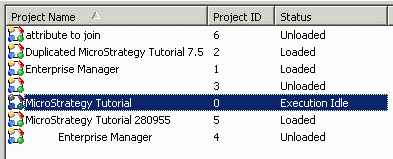
 

ka04W000000OeElQAK_0EM440000002BbF.gif

 
The job monitor is unchanged at first, because it takes some time for the query for job 107 to be canceled on the database. When the cancellation is complete, however, job 203 becomes "Waiting for project" and job 205 begins executing.
 

ka04W000000OeElQAK_0EM440000002BbE.gif

 
CAUSE:
This issue is the result of the way Strategy Intelligence Server checks jobs against the project idle status.
 
When a job is created in Strategy Intelligence Server, the project status is checked to ensure that the job may be executed. If the project is loaded, the job is assigned a database connection thread or placed in the queue. If the status is Execution Idle, the job goes into the queue with the status of "Waiting for project."
 
In this scenario, however, the job has already been approved for execution because the project status was "Loaded" at the time the job was created. It is, therefore, waiting for the next available database connection thread. That thread becomes available when a job that had been executing is canceled successfully on the database, so the job takes the thread and begins executing (because the execution was valid initially).
 
ACTION:
To guarantee that jobs do not run against the warehouse when the project is idle, it is recommended to use Strategy Administrator - Command Manager to perform two steps.
 

  1. Idle the project.
  2. Terminate the jobs that remain in the job monitor.

The following Strategy Administrator - Command Manager script may be used to perform these tasks.
 
IDLE PROJECT "" MODE EXECUTION;
KILL ALL JOBS;
Note that it is not possible to cancel jobs per project in Strategy Administrator - Command Manager. If that is required, the job monitor display may be sorted by project ID and the correct jobs selected as a group.


Comment

0 comments

Details

Knowledge Article

Published:

June 12, 2017

Last Updated:

June 12, 2017