Strategy Intelligence Server provides the capability of Asymmetric Clustering where different sets of projects can be loaded on different nodes of a Strategy Intelligence Server cluster.
Users can define the projects and the nodes on which they are to be loaded through the General settings under the Projects tab in the Strategy Intelligence Server Configuration. In addition to these settings, it is also possible to define the cluster behavior for these projects under unexpected shutdown of the node they are loaded on via Project Failover Latency and Configuration Recovery Latency settings.
These settings are available under the Advanced settings on the Server Definition tab, as shown below:
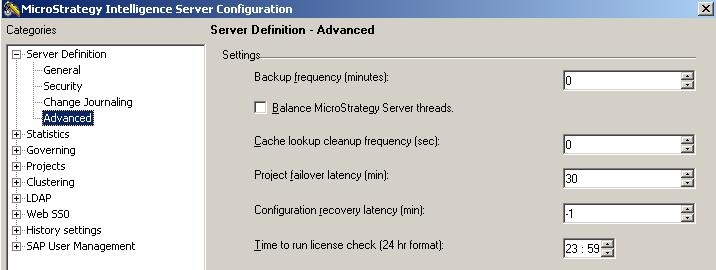
Project Failover latency:
The project failover latency setting defines the time for which a project is unavailable after which it will be loaded onto another server. A value of '0' indicates that a project will be failed over to the surviving node immediately i.e as soon as the server hosting a project goes down, this project will be loaded on the other server immediately. A value of '-1' indicates that failover is disabled and a project will be never failed over to the surviving node.
Configuration Recovery Latency:
This setting defines the time after which a project is available on the server it is supposed to be loaded on, when the cluster will revert to its original configuration. For this setting also, a value of '0' indicates that a project will be reverted back to original configuration (server) as soon as the original server hosting the project comes back. A value of '-1' indicates that a the project will stay on the failedover server and not go back to the original server.
