EducationSoftwareStrategy.com
StrategyCommunity

Knowledge Base

Product

Community

Knowledge Base

TopicsBrowse ArticlesDeveloper Zone

Product

Download SoftwareProduct DocumentationSecurity Hub

Education

Tutorial VideosSolution GalleryEducation courses

Community

GuidelinesGrandmastersEvents
x_social-icon_white.svglinkedin_social-icon_white.svg
Strategy logoCommunity

© Strategy Inc. All Rights Reserved.

LegalTerms of UsePrivacy Policy
  1. Home
  2. Topics

KB14442: ‘Syntax error or access violation: Variable #table_name# not found’ error occurs when attempting to execute a datamart report against Sybase IQ 12.5 in MicroStrategy Developer 9.4.1 and 10.x


Stefan Zepeda

Salesforce Solutions Architect • Strategy


When a user attempts to execute a datamart report in MicroStrategy Developer 9.4.1 and 10.x against Sybase IQ 12.5, the following error occurs: SQLExecDirect. Syntax error or access violation: Variable '#table_name#' not found
SYMPTOM:
When a user attempts to execute a datamart report in Strategy Developer 9.4.1 and 10.x against Sybase IQ 12.5, the following error occurs:


SQLExecDirect. Syntax error or access violation: Variable '#table_name#' not found


STEPS TO REPRODUCE:
Follow the steps below to reproduce this issue in the Strategy Tutorial project against Sybase IQ 12.5:
 

  • Create a report with one attribute.
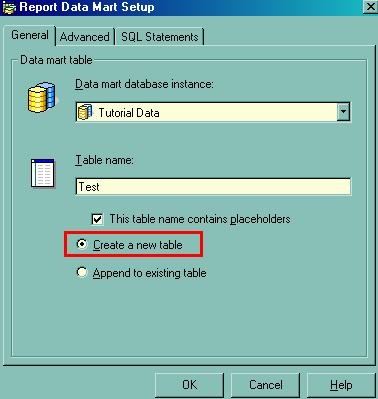
  • Configure the report as datamart report with the 'Create a new table' option selected, as shown below:
ka02R000000kXXPQA2_0EM440000002FQr.jpeg
  • Execute the report. The error described above occurs.
  • The SQL for the datamart pass looks something like:
    select distinct COL1,...
    into DATAMART_TABLE
    from TABLE1,....

CAUSE:
The above SQL syntax 'Select ... Insert into #table_name#', does not constitute valid SQL syntax against Sybase IQ 12.5, it is however valid against Sybase IQ 12.6.
 
ACTION:
Change the VLDB setting 'Table Creation Type' to 'Explicit Table' for the datamart database instance, as shown below:
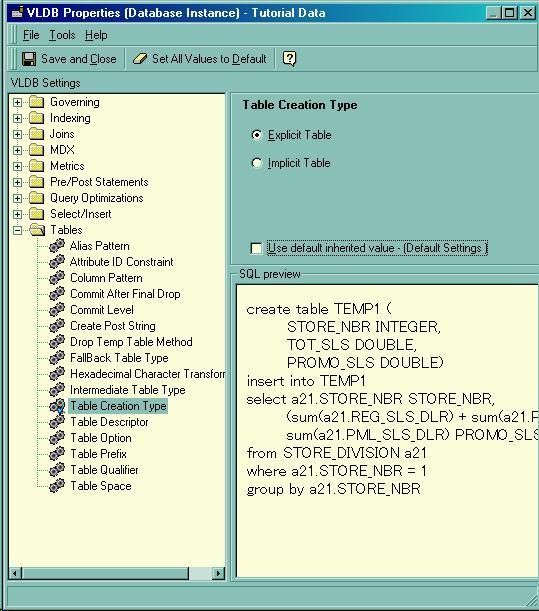
 

ka02R000000kXXPQA2_0EM440000002FQq.jpeg


Comment

0 comments

Details

Knowledge Article

Published:

June 14, 2017

Last Updated:

June 14, 2017