EducationSoftwareStrategy.com
StrategyCommunity

Knowledge Base

Product

Community

Knowledge Base

TopicsBrowse ArticlesDeveloper Zone

Product

Download SoftwareProduct DocumentationSecurity Hub

Education

Tutorial VideosSolution GalleryEducation courses

Community

GuidelinesGrandmastersEvents
x_social-icon_white.svglinkedin_social-icon_white.svg
Strategy logoCommunity

© Strategy Inc. All Rights Reserved.

LegalTerms of UsePrivacy Policy
  1. Home
  2. Topics

KB14464: NT user locale applied instead of MicroStrategy Developer locale in parts of MicroStrategy Developer 9.4.1 and 10.x


Stefan Zepeda

Salesforce Solutions Architect • Strategy


NT user locale applied instead of MicroStrategy Developer locale in parts of MicroStrategy Developer 9.4.1 and 10.x

SYMPTOM
The Strategy Developer locale is not applied throughout Strategy Desktop Developer 9.4.1 and 10.x
 
STEPS TO REPRODUCE
Follow the steps below to reproduce this issue:
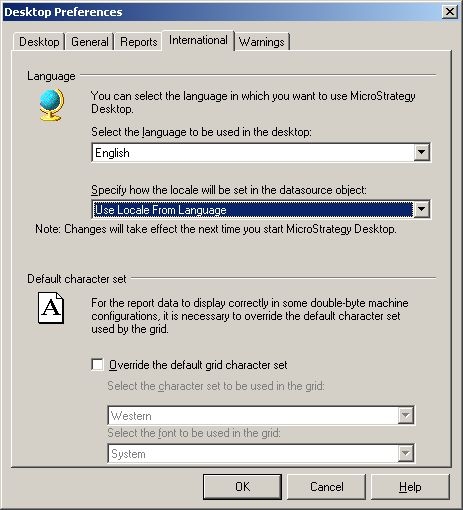
  • Go to Desktop preferences -> International in Strategy Developer 9.4.1 and 10.x
  • Set the Strategy Developer language to English.
  • Set 'Use locale from language' setting, as shown below:
ka02R000000kXOPQA2_0EM440000002FRH.jpeg
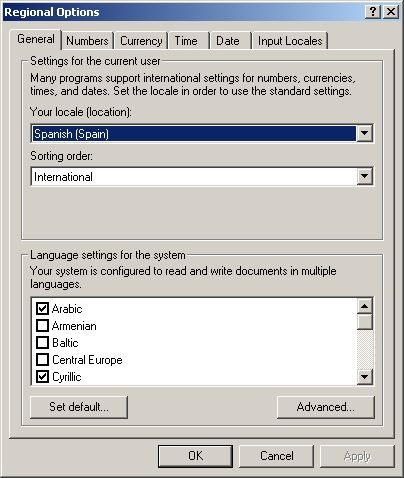
  • In the Microsoft Windows Regional Options (in this example Windows 2000) set 'Your locale (location)' to Spanish (Spain) or any language supported by Strategy, such as French, German, Swedish, Italian, etc. as shown below:
ka02R000000kXOPQA2_0EM440000002FRF.jpeg
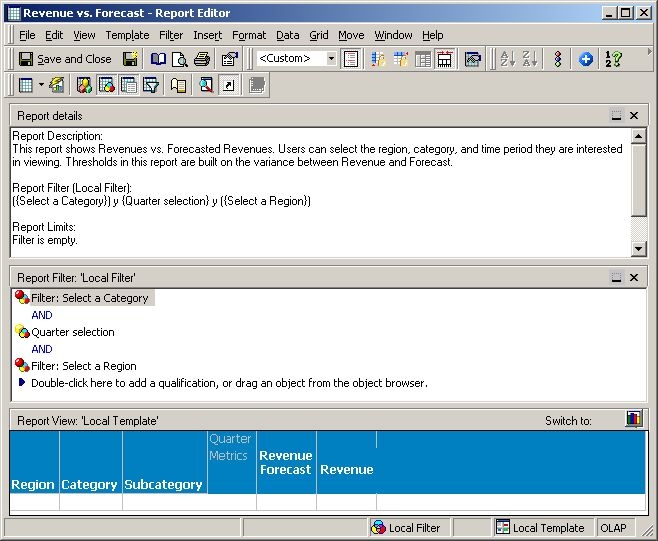
  • Open a report in edit mode (e.g. Revenue vs Forecast.) Note that instead of 'and' (English), 'y' (Spanish) appears under Report Filter Report details, as shown below:
ka02R000000kXOPQA2_0EM440000002FRG.jpeg
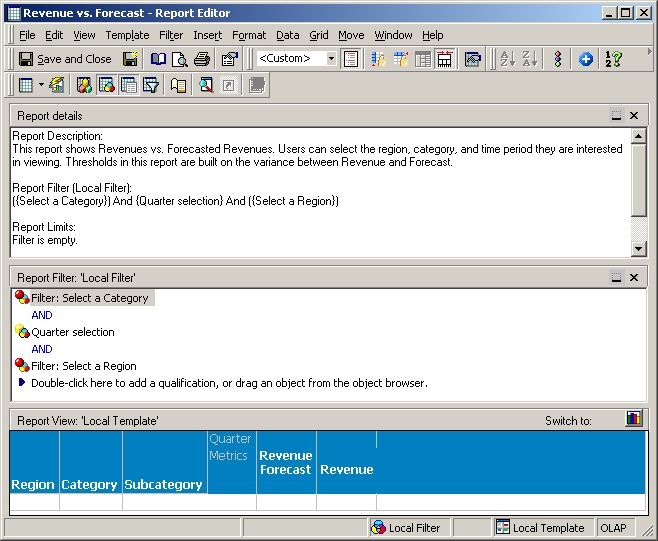
  • If the Microsoft Windows NT user locale is set to English, then the report is displayed in English, as shown below:
ka02R000000kXOPQA2_0EM440000002FRE.jpeg
ka02R000000kXOPQA2_0EM440000002QhT.jpeg

CAUSE
This is a known issue in Strategy Developer 9.4.1 and 10.x. This issue will only affect users where the Microsoft Windows NT user locale is different from the Strategy Developer locale and where the Microsoft Windows NT user locale corresponds to a Strategy supported language.
 
ACTION
Contact Strategy Technical Support for an update regarding this issue.


Comment

0 comments

Details

Knowledge Article

Published:

June 15, 2017

Last Updated:

June 15, 2017