EducationSoftwareStrategy.com
StrategyCommunity

Knowledge Base

Product

Community

Knowledge Base

TopicsBrowse ArticlesDeveloper Zone

Product

Download SoftwareProduct DocumentationSecurity Hub

Education

Tutorial VideosSolution GalleryEducation courses

Community

GuidelinesGrandmastersEvents
x_social-icon_white.svglinkedin_social-icon_white.svg
Strategy logoCommunity

© Strategy Inc. All Rights Reserved.

LegalTerms of UsePrivacy Policy
  1. Home
  2. Topics

KB14466: Users are unable to create and modify schema objects in Microstrategy Developer 9.x


Stefan Zepeda

Salesforce Solutions Architect • Strategy


Users are unable to create and modify schema objects in Microstrategy Developer 9.x

SYMPTOM:
A user is unable to perform schema manipulations in Strategy Developer 9.x.
 
STEPS TO REPRODUCE:
Follow the steps below to reproduce this issue in the Strategy Tutorial project:
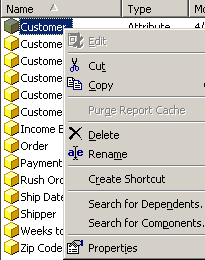
 

  • Right-clicks on the 'Customer' attribute. Notice that the 'Edit' option is greyed out, as shown below:
ka02R000000kcZQQAY_0EM440000002FQ5.jpeg
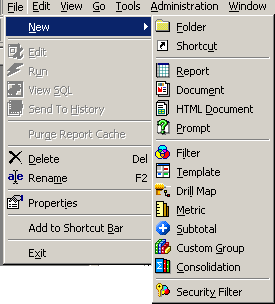
  • Click File -> New and notice that there is no option to create any new schema objects, as shown below:
ka02R000000kcZQQAY_0EM440000002FQ7.jpeg
  • The Schema menu is also missing from the main toolbar, as shown below:
ka02R000000kcZQQAY_0EM440000002FQ9.jpeg

CAUSE:
This occurs because Strategy Architect 9.x, which performs schema related operations, is not installed with the product.
 
ACTION:
In order to be able to perform schema manipulations, the user needs to install Strategy Architect 9.x. The user can modify the installation to include Strategy Architect 9.x from the list of components available under 'Strategy Developer Products,' as shown below:
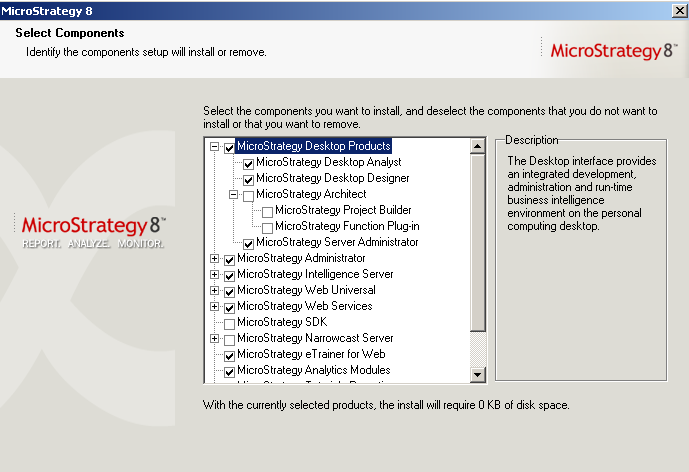
 

ka02R000000kcZQQAY_0EM440000002FQB.jpeg


Comment

0 comments

Details

Knowledge Article

Published:

April 12, 2017

Last Updated:

April 12, 2017