EducationSoftwareStrategy.com
StrategyCommunity

Knowledge Base

Product

Community

Knowledge Base

TopicsBrowse ArticlesDeveloper Zone

Product

Download SoftwareProduct DocumentationSecurity Hub

Education

Tutorial VideosSolution GalleryEducation courses

Community

GuidelinesGrandmastersEvents
x_social-icon_white.svglinkedin_social-icon_white.svg
Strategy logoCommunity

© Strategy Inc. All Rights Reserved.

LegalTerms of UsePrivacy Policy
  1. Home
  2. Topics

KB14506: What is the purpose the columns ‘System log’ and ‘Console log’ in the MicroStrategy 9.x and 10.x Diagnostics and Performance Logging tool in UNIX?


Community Admin

• Strategy


This KB discusses the purpose of the 'System Log' and 'Console Log' columns seen in the Diagnostics and Performance Logging Tool.

The Diagnostics Configuration tab in the Strategy 9.x Diagnostics and Performance Logging tool contains the columns 'System log' and 'Console log.' Checking the 'System Log' box will lead to messages being written to the Microsoft Windows Event Viewer file, for that specific component and dispatcher combination. The 'Console log' setting is used for internal testing purposes and is not meaningful in production deployments.
 
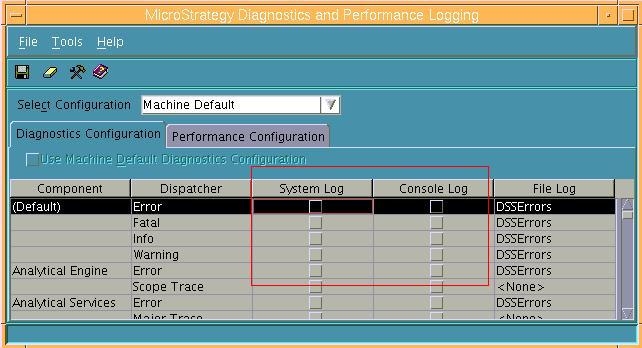
The Strategy Diagnostics and Performance Logging tool shipped with Microsoft Windows and UNIX are the same in Strategy 9.x and newer, and hence, the UNIX versions also have the two columns, as shown below:
ka04W000000OhfvQAC_0EM440000002HXF.jpeg

 
Checking either of these columns have no impact on Strategy logging functionality on UNIX, as both the Event Viewer and the Strategy Monitor are available only on Microsoft Windows.


Comment

0 comments

Details

Knowledge Article

Published:

April 26, 2017

Last Updated:

April 26, 2017