When executing reports in Strategy Developer 9.x, there may be a case in which there is no data for a particular combination of a metric at a certain attribute level. Depending on the layout or requirements of the report, null values may appear in the final output. In the null values display settings under Report Data Options -> Display -> Null Values, there are two text boxes that may be filled out, as shown below:
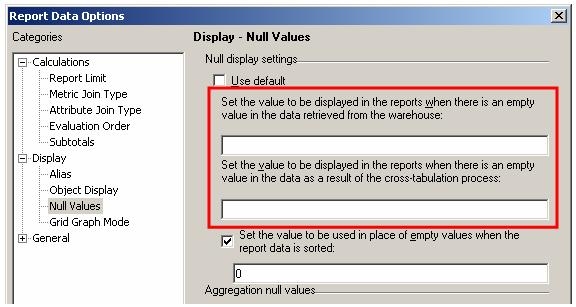
The first text box describes what the developer would like the user to see if the output is a null value persisting from the warehouse.
The second option is the display as a result of the cross-tabulation process that is performed by the analytical engine that created the grid seen in the final output.
How does this affect report output? One of the qualifications of a warehouse null is that is an empty cell is in the warehouse. However, there is a caveat to this null value type. Consider the following report structure that has Item, Revenue, and Month in the template and is filtered on Year = 2003 and Subcategory = 'Arts & Architecture'. When executed, the grid appears as follows:
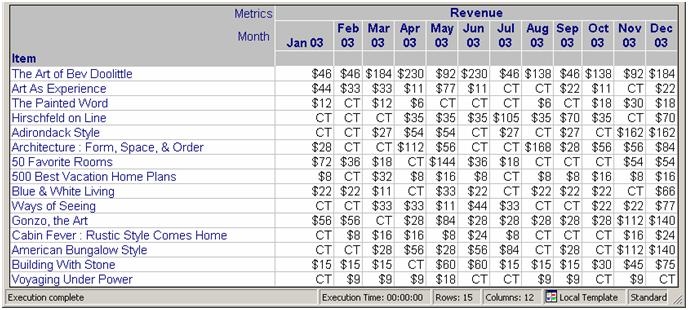
NOTE: The cross-tabulation nulls are marked as 'CT' and warehouse nulls are marked as 'WH'.
Now, if the VLDB Properties are changed to create an outer join to the lookup table, the report result changes to:
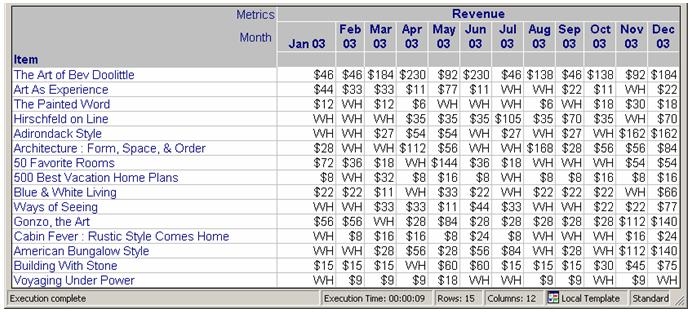
The important thing here is that one of the qualifications for a warehouse is that it is an empty cell in the warehouse. This is true, but in this case there was no null value in any cell in the warehouse. The null was created as a result of the SQL run against the warehouse. The more robust definition of a warehouse null value is any null cell in the result set before reaching the analytical engine. This encompasses null cells in the warehouse as well as Null values created by SQL.
