SYMPTOM:
Consider the following report that has Item, Revenue, and Month in the template and is filtered on Year = 2003 and Subcategory = 'Arts & Architecture'. The requirement of this report is to show all months when Item is in the page-by. When executed without any items in the page-by, the grid displays as follows:
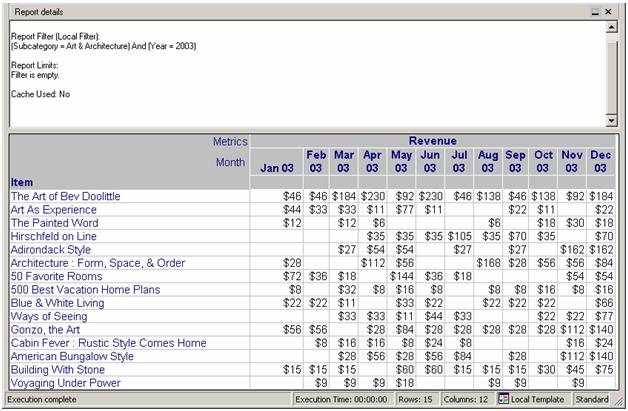
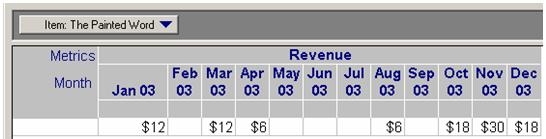
Notice that there are many null values in this display of the report. However, if Item is moved to the page-by and 'The Painted Word' is selected, the dates with null values are not shown:
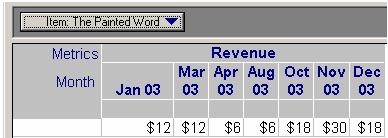
NOTE: Only seven of the twelve months are shown in the report.
CAUSE:
This issue occurs because the null values created in the grid display with no attributes in the page-by are cross-tabulation nulls and are a result of the analytical engine formatting the grid. When the page-by is selected, the grid is changed and reformatted, meaning the null values that appeared before do not appear anymore. It becomes the same grid as if a new report was executed that was filtered on the selected page-by attribute element.
ACTION:
To resolve this issue and satisfy the requirements of the report, make the following VLDB Settings changes:
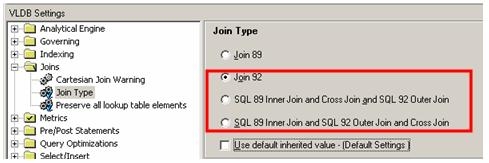
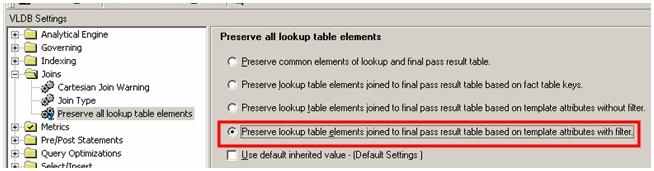
This will create an outer join to the lookup table for the attributes on the template and they will display because the cross-tabulation nulls become warehouse nulls as a result of the changed SQL. The new report display satisfies all requirements of the report, as shown below:
For more information regarding warehouse null values and cross-tabulation null values, consult the following Strategy Knowledge Base technical notes:
KB5391 (KB5800-7X0-0081) - What is the difference between a Database Null and a Cross-Tab Null in Strategy Product Suite 9.x?
KB14560 (KB5700-8X-2152) - Cross-tabulation nulls vs. warehouse nulls in Strategy Desktop 9.x
