The Strategy SQL Generation Engine uses correlated subqueries found in the WHERE clause of a SQL statement when the relationship between one or more filtering attributes in the template attributes is more complex than hierarchies of attributes in one-to-many relationships. Some of the conditions that can cause a subquery to be generated for a filtering condition are as follows:
NOTE: The presence of one of these conditions may not cause a subquery to be generated in every case. These are possible reasons why a subquery might be generated.
NOTE: This is not an exhaustive list of Strategy's uses of subqueries. More details on subqueries in Strategy SQL may be found in the following Strategy Knowledge Base article:
KB13870 - What is the VLDB property "Sub Query Type" in Strategy SQL Generation Engine
In cases where the attribute relationships are potentially ambiguous, the Strategy SQL Generation Engine will attempt to convert the attributes in the filtering qualification to the level of the template attributes. All of the template attributes will be considered as a unit. This sometimes produces SQL that is expensive to run on the database, particularly if multiple attribute lookup tables are combined using cross joins. In this case, the report SQL may not be possible to complete on the database.
By using relationship filters, Strategy SQL Generation Engine's automatic filter conversion can be replaced with a manual filter conversion, and the manual conversion can be targeted to specific attributes that avoid the combination of multiple attributes in the same subquery.
For an example of this situation, consider the following report definition and schema:
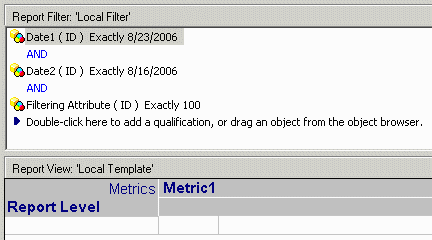
Note that two of the filtering conditions, Date2 and Filtering Attribute, are related to the report level and Date1 attributes through a branch of the relationship level attribute other than the branch containing the fact table. This creates an implicit many-to-many relationship and subqueries might be expected.
The report generates the following SQL:
select   a12.RptLevelID RptLevelID,
   max(a13.RptLevelDESC) RptLevelDESC,
   sum(a11.FactValue) WJXBFS1
from   KB823_FactTable   a11
   join   KB823_LU_Rel   a12
    on    (a11.RelLevelID = a12.RelLevelID)
   join   KB823_LU_RptLevel   a13
    on    (a12.RptLevelID = a13.RptLevelID)
where   (((a12.RptLevelID)
in   (select   c22.RptLevelID
   from   KB823_Alt_Fact   c21
      join   KB823_LU_Rel   c22
       on    (c21.RelLevelID = c22.RelLevelID)
   where   c21.Date2ID = CONVERT(datetime, '2006-08-16 00:00:00', 120)))
and ((a12.RptLevelID)
in   (select   c23.RptLevelID
   from   KB823_LU_FilterAttr   c21
      join   KB823_Alt_Fact   c22
       on    (c21.FilterAttrID = c22.FilterAttrID)
      join   KB823_LU_Rel   c23
       on    (c22.RelLevelID = c23.RelLevelID)
   where   c21.FilterAttrID = 100))
and a12.Date1ID = CONVERT(datetime, '2006-08-23 00:00:00', 120))
group by   a12.RptLevelID
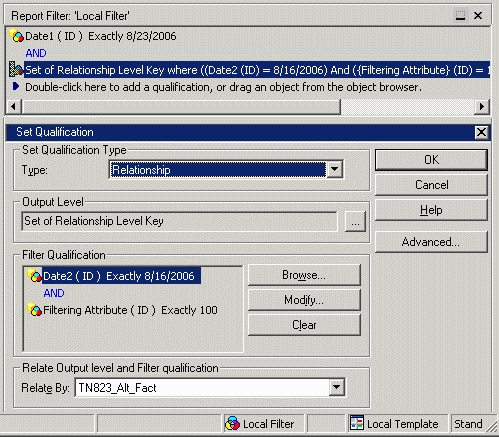
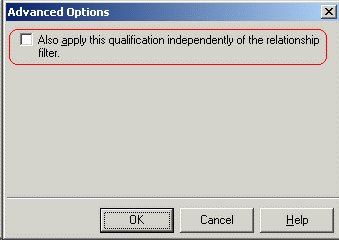
Also be sure to clear the option in the advanced dialog to apply the filter independently of the relationship filter, as shown below. If this option is selected, the subqueries will still be generated.
select   a12.RptLevelID RptLevelID,
   max(a13.RptLevelDESC) RptLevelDESC,
   sum(a11.FactValue) WJXBFS1
from   KB823_FactTable   a11
   join   KB823_LU_Rel   a12
    on    (a11.RelLevelID = a12.RelLevelID)
   join   KB823_LU_RptLevel   a13
    on    (a12.RptLevelID = a13.RptLevelID)
where   (((a11.RelLevelID)
in   (select   r11.RelLevelID
   from   KB823_Alt_Fact   r11
   where   (r11.Date2ID = CONVERT(datetime, '2006-08-16 00:00:00', 120)
    and r11.FilterAttrID = 100)))
and a12.Date1ID = CONVERT(datetime, '2006-08-23 00:00:00', 120))
group by   a12.RptLevelID
