SYMPTOM:
Asymmetric clustering is a feature in the Strategy Intelligence Server that allows different projects to be loaded in each node of a Strategy Intelligence Server cluster. For more details, consult the Strategy System Administration Guide for the section on 'Distributing projects across nodes in a cluster' in Chapter 5, 'Scaling the System to Many Users.'
If two or more Strategy Intelligence Servers are configured in an asymmetric cluster, statistics for one or more nodes in the cluster may be absent from Strategy Enterprise Manager reports. The issue is not specific to projects, but specific to cluster nodes (Strategy Intelligence Server machines).
The issue is characterized by the following features:
The issue may occur in any configuration where the Single Instance Session Logging project is not loaded. The Intelligence Server Configuration dialog allows the user to select only a loaded project, but a legacy project may have been chosen at one time and then unloaded later. This scenario may also produce the issue.
The issue may be verified by executing SQL directly against the Strategy Enterprise Manager statistics tables. Use the following queries and note that the date syntax should be adjusted for the database platform being used.
To identify the machines for which session statistics exist in a certain time range, use the query below:
select distinct servermachine
from IS_SESSION_STATS
where recordtime between 'start-date' and 'end-date'
To identify the machines for which report statistics exist in a certain time range, use the query below:
select distinct servermachine
from IS_REPORT_STATS
where recordtime between 'start-date' and 'end-date'
If the issue described in this technical note is occurring, the results of these queries will be different. Machines will appear in the IS_REPORT_STATS results that are absent from the IS_SESSION_STATS results, as shown below:
The certificate store component needs to be configured. | The certificate store component needs to be configured. | The certificate store component needs to be configured. |
The certificate store component needs to be configured. | The certificate store component needs to be configured. | The certificate store component needs to be configured. |
The certificate store component needs to be configured. | The certificate store component needs to be configured. | The certificate store component needs to be configured. |
The certificate store component needs to be configured. | The certificate store component needs to be configured. | The certificate store component needs to be configured. |
CAUSE:
The issue occurs because of a detail in the implementation of Single Instance Session Logging which affects asymmetric clusters only. It also depends on the difference between session statistics at the server level and statistics at the project level.
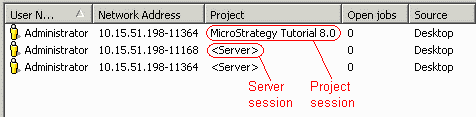
There are two kinds of sessions in Strategy Intelligence Server. To log into a project, a user must first log into the Strategy Intelligence Server as a whole. The Strategy Intelligence Server login is considered a server session and appears in the user connection monitor under the project <Server<. The user may subsequently log into a specific project, creating a project session whose project name is listed in the user connection monitor, as shown below:
Every server definition contains statistics logging properties for every project. One of these properties is the database instance to be used for statistics logging. This may be different for each project; however, if single instance session logging is in use, the database instance should be the same for all projects.
The Strategy Intelligence Server may access the statistics database instance only through the project reference contained in the server definition. For this reason, when single instance session logging is configured in the server definition, the user must select a project rather than a database instance specified where server session statistics will be recorded.
Single Instance versus Complete session logging controls the logging of server sessions. Complete session logging records server-level session statistics at the time of the project login and uses the database instance assigned to the project. Single instance session logging records all server-level session statistics using the statistics database instance for the project specified in the Strategy Intelligence Server Configuration's Statistics panel, as shown below:
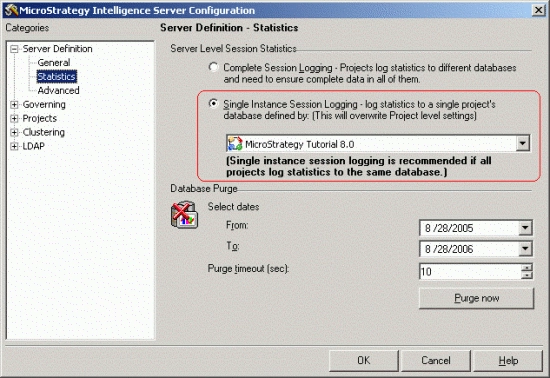
Asymmetric clustering introduces the possibility that the project specified for single instance session logging may not be loaded on all the nodes of the cluster. If that project is unloaded on certain cluster nodes, the recording of server session statistics will fail. Strategy Intelligence Server will look to the single instance session logging project to obtain the database instance information. However, when this project is not loaded, the statistics database instance is not available and Strategy Intelligence Server does not know where to write the statistics.
Logging statistics for project sessions and Intelligence Server jobs is successful because the statistics are recorded into the database instance for the project the user has logged into. By definition, this project must be loaded on the Strategy Intelligence Server where the project session exists.
Statistics are missing from Strategy Enterprise Manager reports because the Strategy Enterprise Manager data load uses server-level session statistics to govern the statistics that are transferred during fact migration. When the server sessions are missing, even though project statistics are present in the statistics tables, the data will not be migrated into the fact tables and will not be available for reporting.
ACTION:
To use single instance session logging successfully in an asymmetric cluster, it is necessary to have at least one project loaded on all cluster nodes. This project must be specified in the Strategy Intelligence Server configuration as the single instance session logging project.
Only one project is required to be loaded on all nodes. Other projects may be distributed as desired. If an asymmetric cluster is being used to control memory usage on individual nodes, the smallest project should be used for single instance session logging and larger projects distributed among the nodes.
All Strategy Intelligence Servers in the cluster must be restarted for the change in statistics configuration to take effect.
To minimize the memory impact of loading a project on all nodes of the cluster, an empty project may be created to which no users have access. This project should be configured to log session statistics and it should be specified as the project to use for single instance session logging. When this project is loaded on all nodes, statistics logging should function as expected. The memory requirement should be minimal if the project does not contain any schema objects.
