EducationSoftwareStrategy.com
StrategyCommunity

Knowledge Base

Product

Community

Knowledge Base

TopicsBrowse ArticlesDeveloper Zone

Product

Download SoftwareProduct DocumentationSecurity Hub

Education

Tutorial VideosSolution GalleryEducation courses

Community

GuidelinesGrandmastersEvents
x_social-icon_white.svglinkedin_social-icon_white.svg
Strategy logoCommunity

© Strategy Inc. All Rights Reserved.

LegalTerms of UsePrivacy Policy
  1. Home
  2. Topics

KB14601: ‘Error in Process method of Component: SQLEngineServer, “XXX”, Job [number], Error Code= -2147212797’ error occurs when executing a report that contains a value prompt in MicroStrategy Developer


Stefan Zepeda

Salesforce Solutions Architect • Strategy


KB14601: ‘Error in Process method of Component: SQLEngineServer, “XXX”, Job [number], Error Code= -2147212797’ error occurs when executing a report that contains a value prompt in MicroStrategy Developer

SYMPTOM:
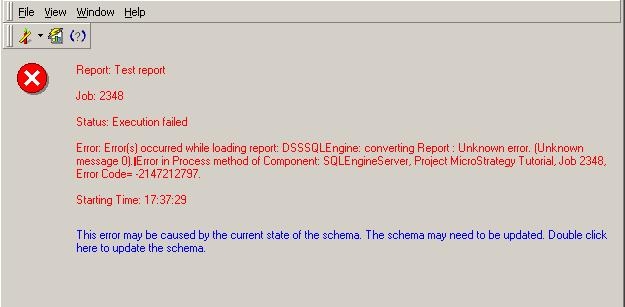
When a user executes a report with an empty value prompt in Strategy Developer where the prompt answer is not required, the following error occurs:
 

ka0PW0000002xiLYAQ_0EM440000002FPD.jpeg

 
Error: Error(s) occurred while loading report: DSSSQLEngine: converting Report :Unknown error. (Unknown message 0) Error in Process method of Component: SQLEngineServer, Project XXX, Job XXX, Error Code= -2147212797.
STEPS TO REPRODUCE:
Follow the steps below to reproduce this issue in the Strategy Tutorial project:
 

  1. Create a value prompt (numeric) and select prompt answer is not required. Save and close as 'Test value prompt.'
  2. Create a metric with the expression: Max (?) {~} . Save and close as 'Test metric with value prompt'.
  3. Create a report with the attribute 'Region' and the metric 'Test metric with value prompt'.
  4. Execute the report and enter '5' for the prompt. The report should execute normally.
  5. Re-prompt the report and leave the answer field blank. The error described above will occur.

CAUSE:
The SQL Engine will not be able to complete the metric operation if the prompt resolution actions cannot ensure a value for the prompt (i.e. prompt answer required is not checked and default value is empty).
 
ACTION:
Provide a default value for the value prompt or make the prompt answer required.


Comment

0 comments

Details

Knowledge Article

Published:

May 18, 2017

Last Updated:

August 12, 2024