Using VLDB properties for Pre/Post Statements, Strategy allows users to input customized SQL in between multi-pass SQL. This document illustrates some of the different Pre/Post statements and how the SQL is affected in Strategy Developer.
To open the VLDB Properties (Report) editor, go to Data -> VLDB Properties in a Strategy report. Under Pre/Post Statements, there are several options to help the user insert customized SQL statements into different sections of the Datamart SQL statement.
The following image illustrates the VLDB setting for Pre/Post Statements:
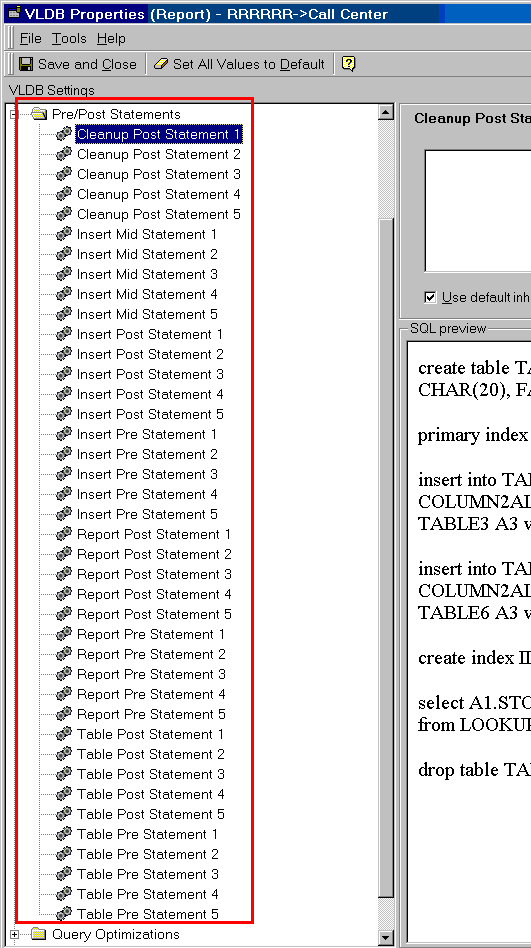
There are eight statements to insert into a SQL statement:
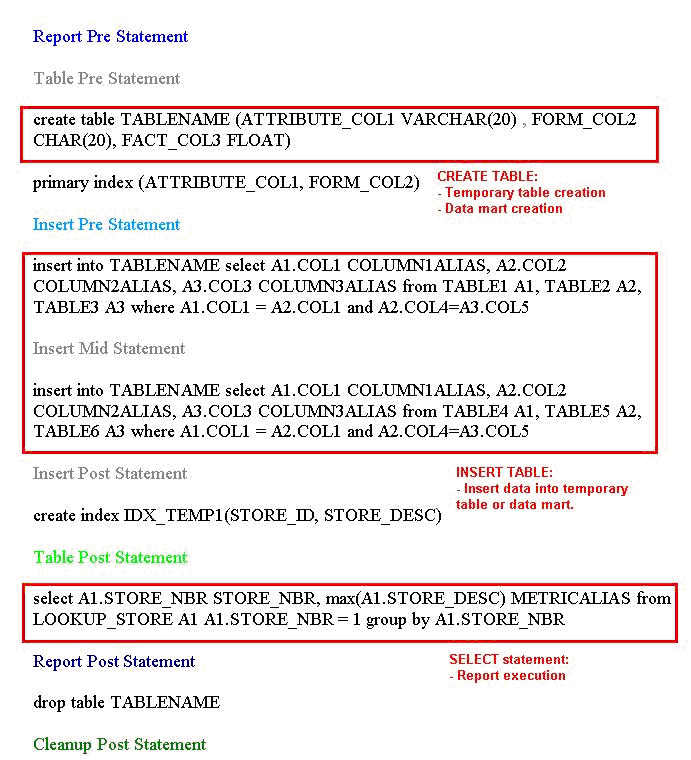
The image below demonstrates some of the statements:
NOTE: SQL statements are passed to the warehouse database one by one. If the last SQL statement is not run successfully, the next SQL statement will not execute. For example, if the create table SQL statement is not run correctly, any SQL statements after create table will not execute.
