EducationSoftwareStrategy.com
StrategyCommunity

Knowledge Base

Product

Community

Knowledge Base

TopicsBrowse ArticlesDeveloper Zone

Product

Download SoftwareProduct DocumentationSecurity Hub

Education

Tutorial VideosSolution GalleryEducation courses

Community

GuidelinesGrandmastersEvents
x_social-icon_white.svglinkedin_social-icon_white.svg
Strategy logoCommunity

© Strategy Inc. All Rights Reserved.

LegalTerms of UsePrivacy Policy
  1. Home
  2. Topics

KB14644: How to hide the Null values in a Report Service document when there is an empty value in the data retrieved from the warehouse at the project level in MicroStrategy Developer 10.x


Stefan Zepeda

Salesforce Solutions Architect • Strategy


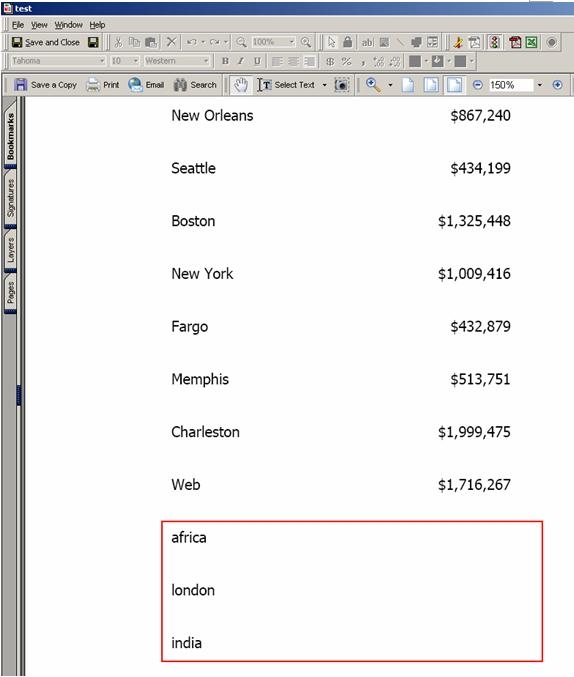
Users may want to hide the Null values in a Report Service document when there is an empty value in the data retrieved from the warehouse at the project level in MicroStrategy Developer 10.x

Users may want to hide the Null values in a Report Service document when there is an empty value in the data retrieved from the warehouse at the project level in Strategy Developer 10.x, as shown below:
ka02R000000kXcIQAU_0EM440000002FMy.jpeg

 
The Null value display setting is set to display '0' at the report level by default.
Follow the steps below to hide the Null values (this example uses the Strategy Tutorial project):
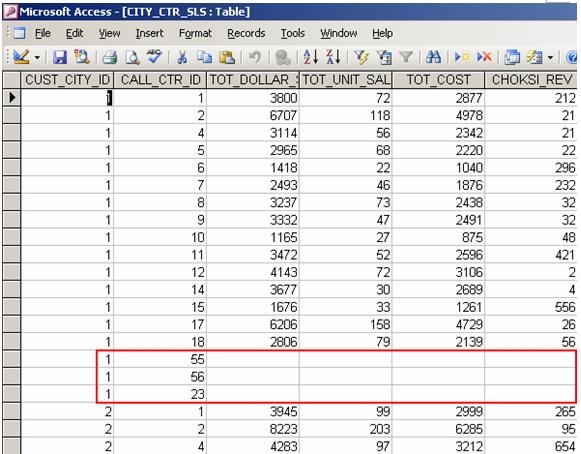
  • Create an additional column in the data warehouse for 'Call Center' displaying no data for the revenue, as shown below:
ka02R000000kXcIQAU_0EM440000002FNI.jpeg
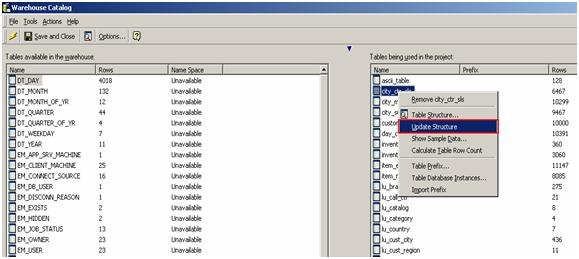
  • Use the Warehouse Catalog to update the table structure for CITY_CTR_SLS, as shown below:
ka02R000000kXcIQAU_0EM440000002FN1.jpeg
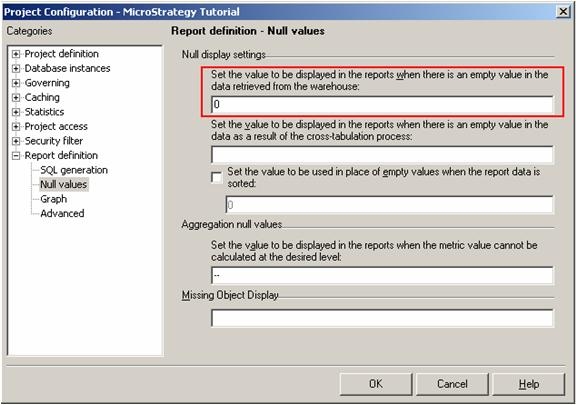
  • Right-click on the project and go to Project Configuration -> Report Definition -> Null values.
  • Under Null value settings, set to display '0' in the report when there is an empty value in the data retrieved from the warehouse at the project level, as shown below:
ka02R000000kXcIQAU_0EM440000002FNE.jpeg
  • Create a report with 'Call Center' as the attribute and 'Revenue' as the metric.
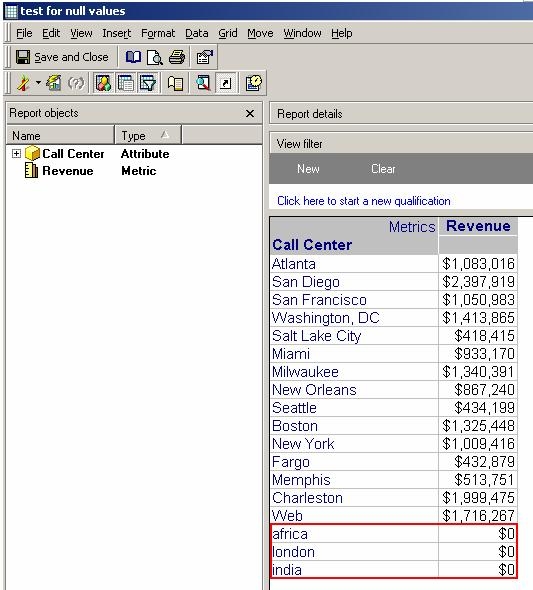
  • Upon execution, the report will return '0' for the 'Call Centers' which have no data returned from the warehouse for 'Revenue', as shown below:
ka02R000000kXcIQAU_0EM440000002FNG.jpeg
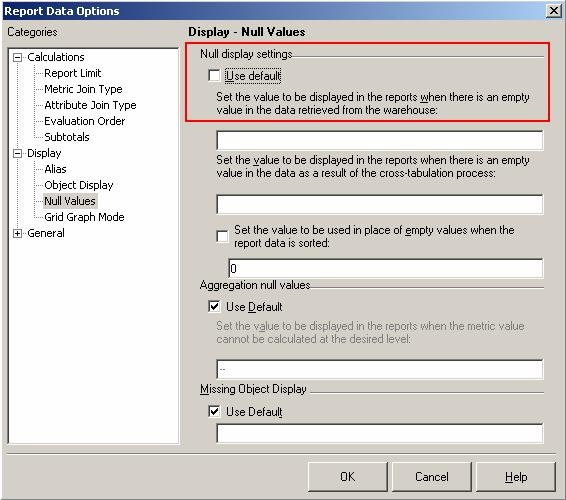
  • On the toolbar go to Data -> Report Data Options -> Display -> Null Values.
  • For the Null display setting, uncheck 'Use default', as shown below:
ka02R000000kXcIQAU_0EM440000002FNK.jpeg
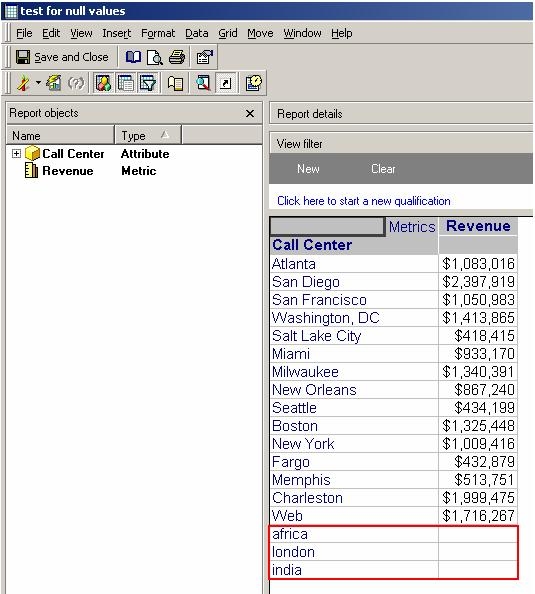
  • The report will now return no data (a blank) for 'Call Centers' which have no data returned from the warehouse for 'Revenue', as shown below:
ka02R000000kXcIQAU_0EM440000002FNF.jpeg
  • Create a document based on this dataset.
  • Drag the attribute and the metric into the 'Detail' section.
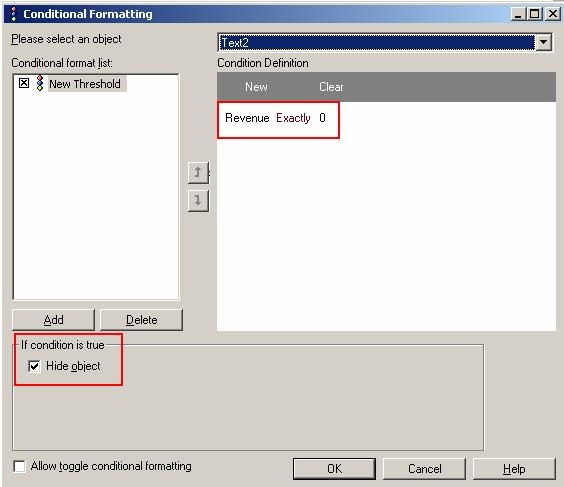
  • Right-click on 'Revenue' (metric) and choose 'Conditional formatting'.
  • Create a new threshold defined as 'Revenue exactly 0'.
  • Select 'if condition is true> hide object'., as shown below:
ka02R000000kXcIQAU_0EM440000002FN0.jpeg
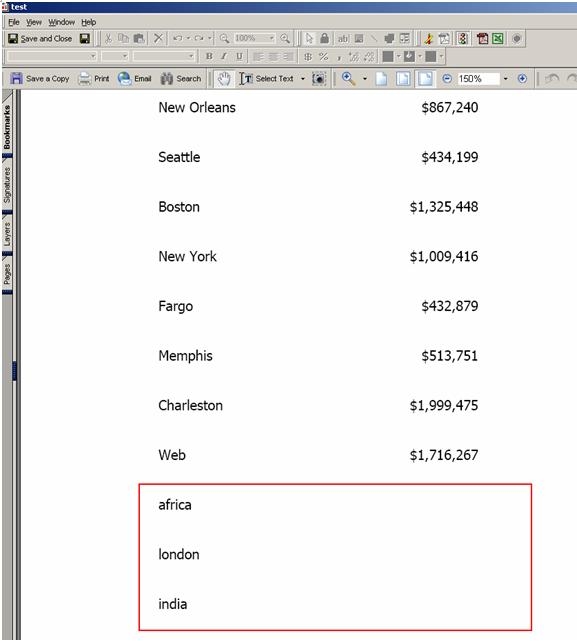
  • On execution, the document will return no data (a blank) for 'Call Centers' which have no data returned from the warehouse for 'Revenue', as shown below:
ka02R000000kXcIQAU_0EM440000002FMz.jpeg

Comment

0 comments

Details

Knowledge Article

Published:

June 14, 2017

Last Updated:

June 14, 2017