SYMPTOM:
The currency formatting is lost for values equal to zero when a grid is placed on a Report Services document in Strategy Developer 10.x. Instead of displaying as $0, the value appears as 0. The metric displays correctly on the underlying report.
The following image shows the grid as seen when executed as a report:
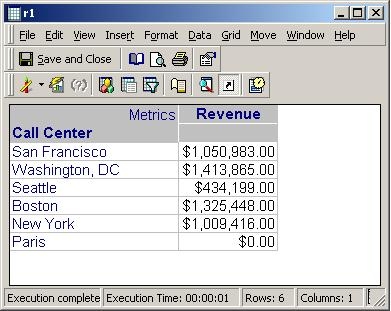
The following image shows the grid as seen when placed on a Report Services document using shift+drag:

Notice that the value for the Paris Call Center is displayed as 0 instead of $0.
CAUSE:
The zero value is actually a warehouse null. This null can arise under two different circumstances:
The null is displayed as a zero because of null value display settings set at the report or project level.
ACTION:
There are two solutions for this issue. The first solution is to apply a threshold on the report. This solution will work for both null situations. The only drawback is that this solution needs to be applied to every report where the issue is seen. Follow the steps below to apply a threshold to the report:
The second solution is to use the NullToZero function on the fact being used by the problematic metric. This solution only works with the second null situation. This solution will not work with a null due to an outer join. Also, this solution will impact all reports using this fact. Follow the steps below to use the NullToZero function on the fact being used by the problematic metric:
