When executing a report in Strategy Web, execution fails.
Error in report results:
Your request could not be processed. Please try again. If the problem persists, contact the Administrator. (Results for this message cannot be retrieved from Strategy Intelligence Server. This might be because the execution has failed. Please contact your administrator.)
<method>GetExecutionResultsEx</method><message>(Results for this message cannot be retrieved from Strategy Intelligence Server. This might be because the execution has failed. Please contact your administrator.) (com.Strategy.webapi.MSTRWebAPIException)</message><exception>com.Strategy.webapi.MSTRWebAPIException: (Results for this message cannot be retrieved from Strategy Intelligence Server. This might be because the execution has failed. Please contact your administrator.)
MsiWorkingSet::PersistMsg(): failed to attach RI to msg, error 0x80003F79CDSSServerMessage::put_OriginalRI: WSResultPool->AddRI for msg xxxx return error 0x80003F79CDSSServerMessage::put_OriginalRI: WSResultPool->AddRI for msg xxxx return error 0x80003F79CDSSServerMessage::GetReportInstance(): get_OriginalRI() return error 0x1
The size of the report that was to be executed has 400MB report cache size while 'Maximum RAM for Working Set cache size' is set as 102400KB, as shown in the image below:
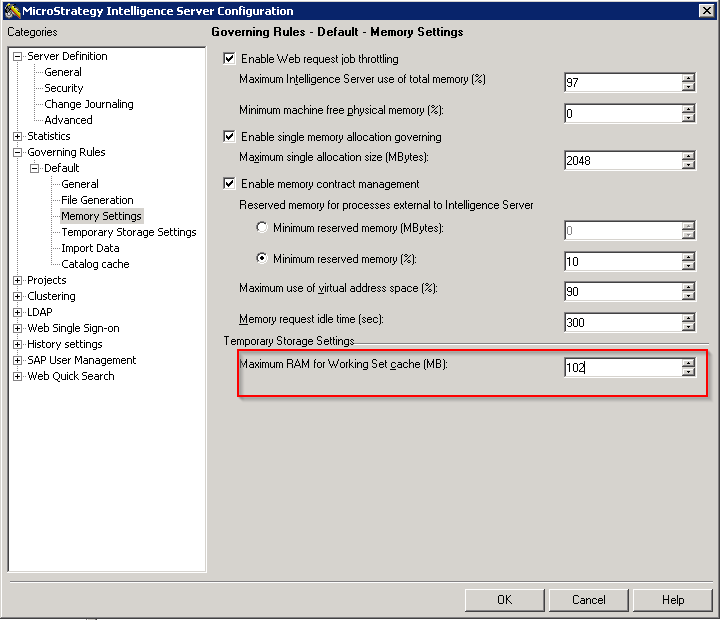
The Strategy Intelligence Server was unable to swap out the report instances of 40MB in the Working Set.
For more information about how Working Set setting governs Strategy Web report execution and why a report instance (RI) sometimes cannot be swapped to disk, refer to the following Strategy Knowledge Base technical notes:
KB8621 - User request is completed. Maximum memory usage has been reached for existing objects." error message is received by users in Strategy Web.
KB8617 - What is the 'Working Set' governor setting which is available in Strategy Intelligence Server 9.x?
Increase the size of Maximum RAM for Working Set cache to a higher value. Depending on the resources available and the version installed, please set the Maximum working set RAM to a number between the following list:
WARNING: Increasing the 'Maximum RAM for Working Set cache' setting will increase the possible limit amount of RAM that can be used by the Strategy Intelligence Server. Setting this to a higher limit does not mean the memory will be set aside for immediate use by the Strategy Intelligence Server. However, if needed, that limit is available, in the same way, the Maximum RAM for cache settings behave.
