EducationSoftwareStrategy.com
StrategyCommunity

Knowledge Base

Product

Community

Knowledge Base

TopicsBrowse ArticlesDeveloper Zone

Product

Download SoftwareProduct DocumentationSecurity Hub

Education

Tutorial VideosSolution GalleryEducation courses

Community

GuidelinesGrandmastersEvents
x_social-icon_white.svglinkedin_social-icon_white.svg
Strategy logoCommunity

© Strategy Inc. All Rights Reserved.

LegalTerms of UsePrivacy Policy
  1. Home
  2. Topics

KB14695: Unable to use recursive only option in MicroStrategy Administrator Command Manager 9.x to alter ACL permissions for folders


Community Admin

• Strategy


When trying to alter ACL permissions for folders recursively through MicroStrategy Administrator Command Manager 9.x, the parent permissions are overwritten to the children folders.

SYMPTOM:
When trying to alter ACL permissions for folders recursively through Strategy Administrator Command Manager 9.x, the parent permissions are overwritten to the children folders. The following is an example of the command used:
 
ALTER ACL FOR FOLDER 'Folder_name' IN FOLDER '\Path\Folder_Name' PROPAGATE OVERWRITE RECURSIVELY FOR PROJECT 'Project_Name';
STEPS TO REPRODUCE:
Follow the steps below to reproduce the issue in the Strategy Tutorial project:
 

  • Log into Strategy Developer 9.x as an administrator.
  • In the Strategy Tutorial project, go to \Public Objects\Reports.
  • Right-click to go to Properties and select the Security tab, as shown below:
ka04W000000OeetQAC_0EM440000002BZu.jpeg
  • Add the Managers group to the Reports folder, as shown below:
ka04W000000OeetQAC_0EM440000002BZs.jpeg
  • Now log into Strategy Administrator Command Manager 8.x and run the following script.
    ALTER ACL FOR FOLDER 'Reports' IN FOLDER '\Public Objects' PROPAGATE OVERWRITE RECURSIVELY FOR PROJECT 'Strategy Tutorial';

The above script overwrites permissions of Reports folder recursively to all the children and sub-children (and so on) folders.
 
CAUSE:
The command is working as designed in Strategy Administrator Command Manager 9.x. The functionality to propagate permissions recursively (without overwriting) from the Reports folder to the children and sub-children folders is currently not available. An enhancement request has been logged to add scripts to support this functionality. Contact Strategy Technical Support for the status of this enhancement.
 
ACTION:
It is recommended to use Strategy Developer 9.x to manually change permissions of children folders.
 
In Strategy Developer 9.x, to ensure the correct parent permissions are propagated to the correct children objects, appropriate options need to be checked. To achieve this objective, follow the steps below:
 

  • Log into Strategy Developer 9.x as an administrator.
  • Select the folder for which the permissions need to be changed.
  • Right-click on that folder and click on Properties.
  • Go to the Security tab.
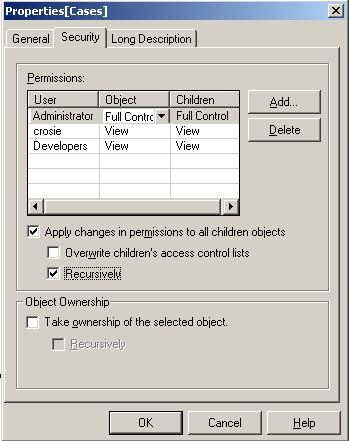
  • Under 'Apply changes in permissions to all children objects,' the user has two options but they can be combined in four different ways. These are explained below:
     
    • Overwrite children's access control lists - This option overwrites parent object permissions only to the immediate children objects, as shown below:
ka04W000000OeetQAC_0EM440000002BZw.jpeg
    • Recursively - This option adds parent object permissions to the immediate children objects as well as the sub-children objects all the way down the hierarchy, as shown below:
ka04W000000OeetQAC_0EM440000002BaF.jpeg
    •  
      NOTE: The children and sub-children objects also retain their original permissions.
       
    • None - This option adds parent object permissions to the immediate children objects only, as shown below:
ka04W000000OeetQAC_0EM440000002BZz.jpeg
    •  
      NOTE - The children objects also retain their original permissions.
       
    • Overwrite and Recursively - This option overwrites parent object permissions to the children as well as the sub-children objects all the way down the object hierarchy, as shown below:
ka04W000000OeetQAC_0EM440000002BZx.jpeg

Comment

0 comments

Details

Knowledge Article

Published:

June 8, 2017

Last Updated:

June 8, 2017