EducationSoftwareStrategy.com
StrategyCommunity

Knowledge Base

Product

Community

Knowledge Base

TopicsBrowse ArticlesDeveloper Zone

Product

Download SoftwareProduct DocumentationSecurity Hub

Education

Tutorial VideosSolution GalleryEducation courses

Community

GuidelinesGrandmastersEvents
x_social-icon_white.svglinkedin_social-icon_white.svg
Strategy logoCommunity

© Strategy Inc. All Rights Reserved.

LegalTerms of UsePrivacy Policy
  1. Home
  2. Topics

KB14702: How to create the xml containing the preference object for personalized report execution in MicroStrategy Narrowcast Server 9.x.


Community Admin

• Strategy


Follow the steps below in order to generate the xml that contains the preference object for personalized report execution using dynamic subscription in Strategy Narrowcast Server 9.x: 
  • Create a question object for personalized report execution that matches the desired personalization requirements.
  • Create a personalized report execution information object that uses the question object above with a static subscription set. Subscribe a user and create a preference object. This will be the sample XML.
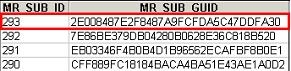
  • Take the MR_SUB_GUID for the top MR_SUB_ID, as shown in the image below. In order to generate them, run the following SQL statement:
ka04W000000OgqIQAS_0EM440000002BZF.jpeg
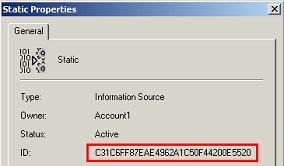
  • Get the ID of the information source and the ID of the question object, as shown below:
ka04W000000OgqIQAS_0EM440000002BZE.jpeg
  • Obtain the MR_PREF_OBJ_ID by running the following SQL statement:
ka04W000000OgqIQAS_0EM440000002BZC.jpeg
  • Finally obtain the XML that is in MR_PREF_OBJ by running the following SQL:
ka04W000000OgqIQAS_0EM440000002BZH.jpeg

For more information on how to create a dynamic subscription service, refer to the following Strategy Knowledge Base technical note:
 
KB12127 (KB6200-800-1298) - How to create a dynamic report execution service in Strategy Narrowcast Server 9.x


Comment

0 comments

Details

Knowledge Article

Published:

June 8, 2017

Last Updated:

June 8, 2017