For prompting and display purposes, users may wish to configure some forms of attributes in MDX schemas to use the 'Date' data type. Setting the data type to 'Date' allows prompts to display a calendar rather than a simple text field, for example.
NOTE: Regardless of the attribute form data type in Strategy, MDX data sources return values as text. The attribute form data type is a user-interface convention. To use date filters in MDX, both the date attribute's ID form and the underlying cube column should be configured with a "date" data type.
Changing a form's data type in an MDX attribute follows the same procedure as for a standard relational attribute:
MDX attributes are considered 'managed objects' and as such do not exist in the normal project folder structure. MDX attributes may be located for editing in the following ways:
From any of these locations, right-click on the attribute and choose 'Edit.' To set a form's data type to Date, select the form from the form list and click 'Modify.' The data type may be set as shown below.
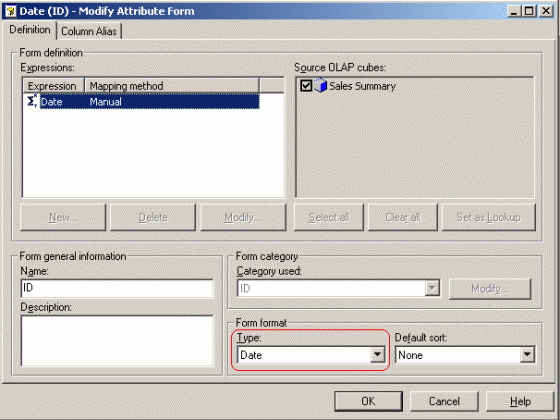
Because of the requirements of MDX, only the form general information and format may be edited.
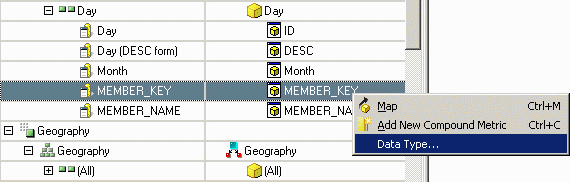
To change the data type of the cube column, edit the cube by locating it under the Data Explorer for the MDX data source. Right-click and choose "Edit" to open the MDX Cube Editor. Locate the column containing unadorned date information, right-click on it, and choose "Data type."
Note: The native MDX IDs are generally not suitable for date conversion, since they include additional information about the dimension and hierarchy to which the value belongs. The raw date values will be found in a "member property" defined in the cube, typically "Key" for SAP and "MEMBER_KEY" for Microsoft Analysis Services. The specific property may vary in Hyperion Essbase.
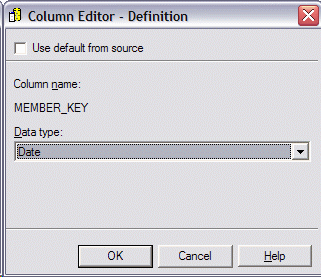
In the Column Editor, uncheck the "Use default from source" option and choose Date from the drop-down menu.
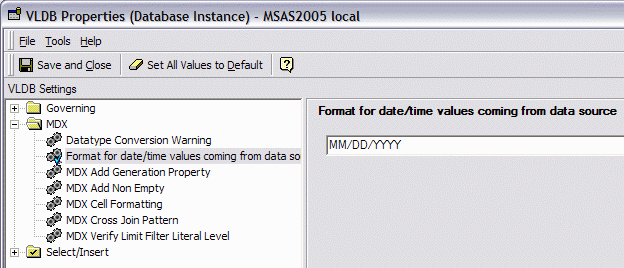
To convert the data strings from the data source into binary dates, set the VLDB Property "Format for date/time values coming from data source" (in the MDX category) to match the date format that will be returned.
Dates and MDX Syntax
Multidimensional cube sources represent all nonnumeric data as text. Strategy assumes that within a given cube data source, all dates will be represented in the same format. It is not supported for different attributes within the same cube, or in different cubes within the same data source, to have different formats. Data uniformity is a prerequisite for filtering on dates against cube databases.
Two scenarios concerning representation of dates in multidimensional expressions (MDX) must be considered separately.
Attribute ID has a Date data type
Attribute IDs are represented in MDX in the form .., where all three are strings. The MDX generation engine uses a pair of VLDB properties to render the desired condition. These VLDB properties are available at the database instance level only; they may not be set individually for specific reports.
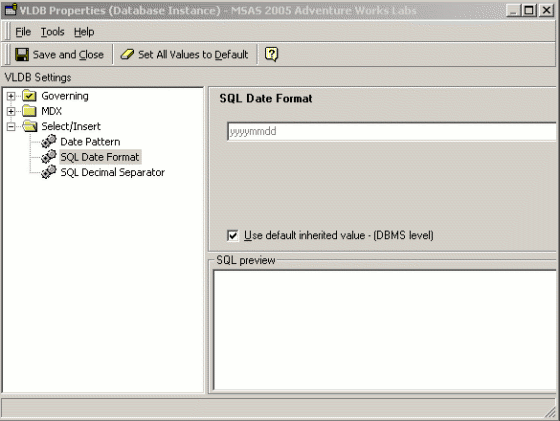
With the default settings, a date qualification defined against an attribute ID will appear in MDX as follows. Observe that the element ID conforms to the SQL Date Format VLDB property specification of 'yyyymmdd.'
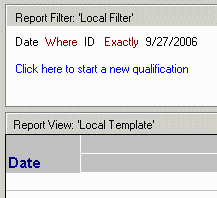
with set as '{..}'
set as '{Generate(, Descendants(..CurrentMember, .., SELF_BEFORE_AFTER))}'
set as '{...members}'
set as 'Intersect({}, {})'
select hierarchize({}) on columns
from
Non-ID Attribute form has a Date data type
In Strategy 9.4.x and higher, attribute qualifications based on any attribute form that uses a member property as its source column will be rendered into MDX using the MDX member name. This is because qualifications depending on date ordering (less than, greater than, between) may return incorrect results if the member property formats the date information in a way that is not valid for string sorting. A member property that returns date strings in the format dd-mm-yyyy would consider "01-05-2017" to precede "02-05-2016," which is evidently not correct. But, if the dates are ordered properly in the definition of the dimension in the cube data source, a set of dates produced by the MDX : (between) operator will return the expected days in all cases.
..&:..&
The SQL Date Format and Date Pattern VLDB properties will be used for MDX rendering in this case also.
KB14716
