EducationSoftwareStrategy.com
StrategyCommunity

Knowledge Base

Product

Community

Knowledge Base

TopicsBrowse ArticlesDeveloper Zone

Product

Download SoftwareProduct DocumentationSecurity Hub

Education

Tutorial VideosSolution GalleryEducation courses

Community

GuidelinesGrandmastersEvents
x_social-icon_white.svglinkedin_social-icon_white.svg
Strategy logoCommunity

© Strategy Inc. All Rights Reserved.

LegalTerms of UsePrivacy Policy
  1. Home
  2. Topics

KB14733: How to dynamically add in temporary table names to VLDB SQL settings in MicroStrategy Developer 9.x - 10.x


Stefan Zepeda

Salesforce Solutions Architect • Strategy


This technical note describes how to dynamically add in temporary table names to VLDB SQL settings in MicroStrategy Developer 9.x - 10.x

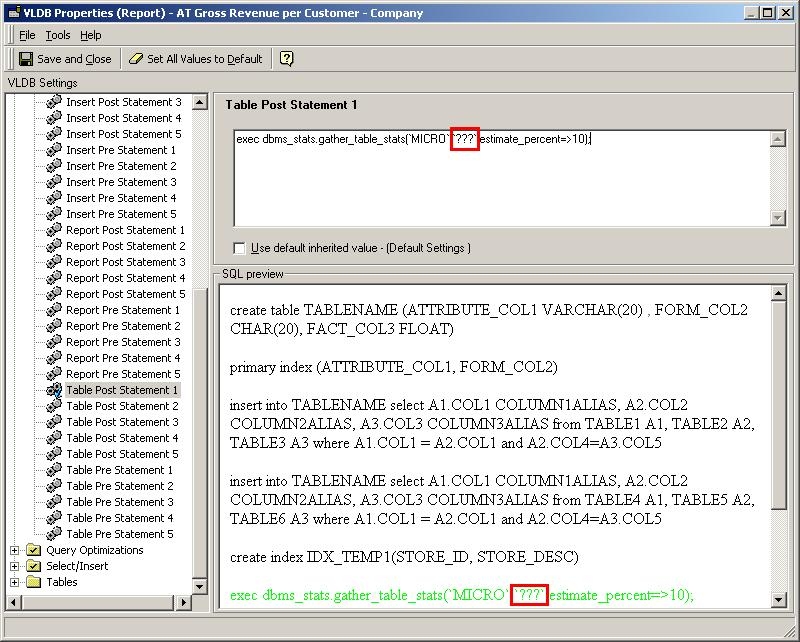
Users may have Analyze statements or other Pre/Post SQL that they want to be executed along with Temporary Tables that are being created or dropped.
Some statements require that users specify the exact temporary table. To do so, users can use the reserved word '???'. This will automatically be converted by the Strategy SQL Engine into the temporary table's name, as shown below:
 

ka02R000000kXQmQAM_0EM440000002FNg.jpeg


Comment

0 comments

Details

Knowledge Article

Published:

June 15, 2017

Last Updated:

June 15, 2017