EducationSoftwareStrategy.com
StrategyCommunity

Knowledge Base

Product

Community

Knowledge Base

TopicsBrowse ArticlesDeveloper Zone

Product

Download SoftwareProduct DocumentationSecurity Hub

Education

Tutorial VideosSolution GalleryEducation courses

Community

GuidelinesGrandmastersEvents
x_social-icon_white.svglinkedin_social-icon_white.svg
Strategy logoCommunity

© Strategy Inc. All Rights Reserved.

LegalTerms of UsePrivacy Policy
  1. Home
  2. Topics

KB14745: How to setup a URL link to a report in another project so that the user does not have to log into that other project in MicroStrategy Web


Community Admin

• Strategy


Using the URL API in Strategy Web, users can create links in documents (Report Services and HTML) that users can simply click on to automatically take them to that report to execute.
 
However, one requirement that a developer may have is that instead of linking to a report inside of the same project where the document is contained, the developer may need to link to a different project on the same Strategy Intelligence Server.
 
The developer can still use the standard URL API syntax as shown below to do so:
 
JSP
mstrWeb?Server={&SERVERNAME}&Project={&PROJECT}&Port=0&evt=4001&src=mstrWeb.4001&reportViewMode=1&reportID=**REPORT_ID**
ASP.NET
Main.aspx?Server={&SERVERNAME}&Project={&PROJECT}&Port=0&evt=4001&src=mstrWeb.4001&reportViewMode=1&reportID=**REPORT_ID**
However, three additional things will need to be true/done:
 

  • The developer needs to statically replace {&PROJECT} with the name of the project the report will be contained in.
  • The user that will be clicking on the URL must have access to the project the report links to.
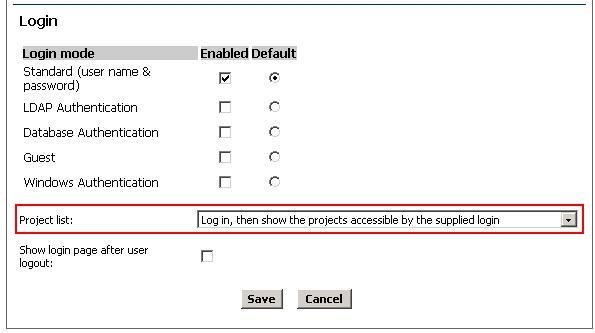
  • The 'Project List' setting on the Web Administration page must be set to 'Log in, then show the projects accessible by the supplied login,' as shown below:
ka04W000000OfhZQAS_0EM4400000028rA.jpeg

Comment

0 comments

Details

Knowledge Article

Published:

October 13, 2017

Last Updated:

October 13, 2017