EducationSoftwareStrategy.com
StrategyCommunity

Knowledge Base

Product

Community

Knowledge Base

TopicsBrowse ArticlesDeveloper Zone

Product

Download SoftwareProduct DocumentationSecurity Hub

Education

Tutorial VideosSolution GalleryEducation courses

Community

GuidelinesGrandmastersEvents
x_social-icon_white.svglinkedin_social-icon_white.svg
Strategy logoCommunity

© Strategy Inc. All Rights Reserved.

LegalTerms of UsePrivacy Policy
  1. Home
  2. Topics

KB14746: Attribute names in the page-by are displayed on one line when printing to PDF in MicroStrategy Web


Community Admin

• Strategy


SYMPTOM:
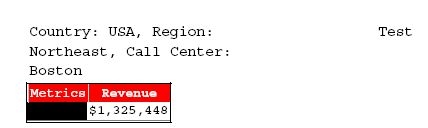
When a report with more than one attribute in the page-by field is executed in Strategy Web 9.x and subsequently exported to PDF, the attributes and their elements are displayed on one line and are word-wrapped, as shown below:
 

ka04W000000OcwYQAS_0EM4400000028r4.jpeg

 
STEPS TO REPRODUCE:
Follow the steps below to reproduce this issue in the Strategy Tutorial project:
 

  • Create a report with the attributes Region, Country, and Call Center and the metric Revenue.
  • Execute the report in Strategy Web 9.x and then export the report to PDF.
  • When the PDF opens, the page-by attributes are in one line and word-wrapped, in this fashion:
    Country: USA, Region:
    Northeast, Call Center:
    Boston
  • When exporting the same report in Microsoft Excel, the page-by attributes are on a separate line, as shown below:
ka04W000000OcwYQAS_0EM4400000028r1.jpeg

CAUSE:
This is a known issue in Strategy Web.
 
ACTION:
Contact Strategy Technical Support for an update to the status of this issue.


Comment

0 comments

Details

Knowledge Article

Published:

July 3, 2017

Last Updated:

July 3, 2017