SYMPTOM:
When running Strategy Office 9.x for the first time, the project source is shown as 'Strategy Tutorial', and when attempting to log in, the following error occurs:
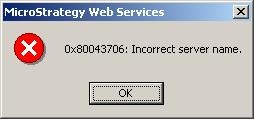
0x80043706: Incorrect server name.
CAUSE:
By default, Strategy Office is configured to look for a Strategy Intelligence Server on localhost server and with a project source name of 'Strategy Tutorial'.
ACTION:
Strategy Office can be configured to use the correct Strategy Intelligence Server through the projectsources.xml file. The file is found in the Program Files\Strategy\Web Services\ folder.
Projectsources.xml contains the following entry:
<ProjectSource>
<ProjectSourceName>Strategy Tutorial</ProjectSourceName>
<ServerName>localhost</ServerName>
<AuthMode>MWSStandard</AuthMode>
<PortNumber>0</PortNumber>
<MaxPooledConnections>100</MaxPooledConnections>
</ProjectSource>
The <ProjectSourceName> value can be replaced with whatever name should be displayed. The <ServerName> should be replaced with the machine name of the Strategy Intelligence Server that Strategy Office will connect to.
