SYMPTOM:
The 'Fixed Columns and Rows' grid options for a Report Services document in Strategy Developer 9.x and 10.x does not retain the custom value set by the user. When setting a fixed value for a column in the grid of a report to a non-whole number, the Report Services document does not retain that value. The value will automatically change to a value that is a tenth of an inch less than the original value.
STEPS TO REPRODUCE:
Follow the steps below to reproduce this issue in the Strategy Tutorial project:
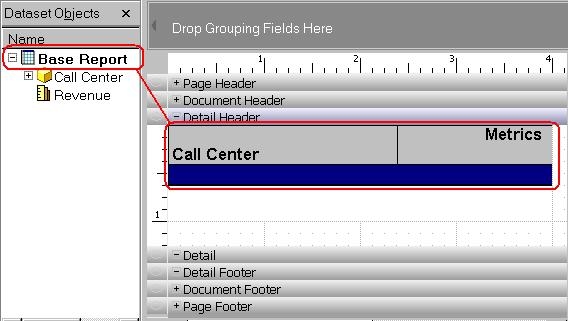
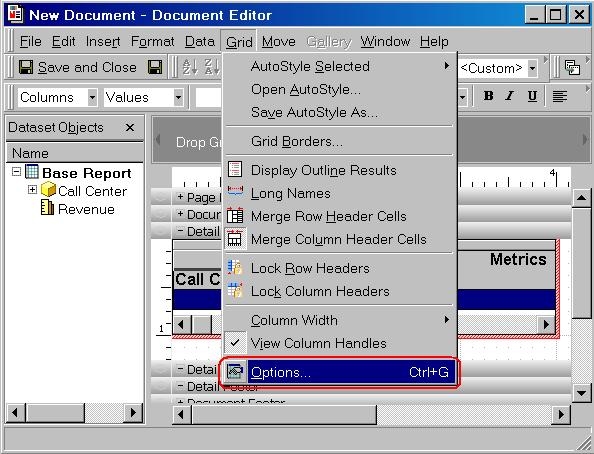
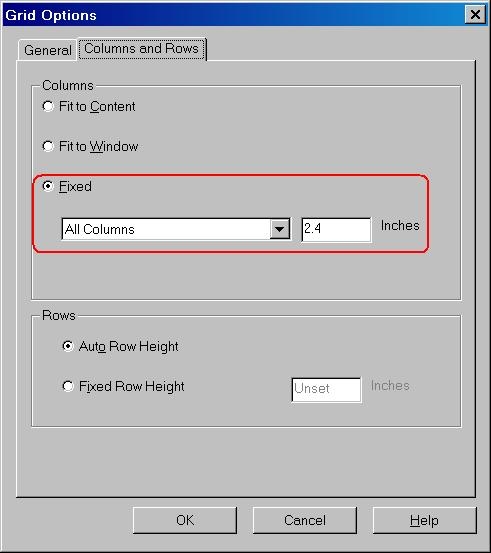
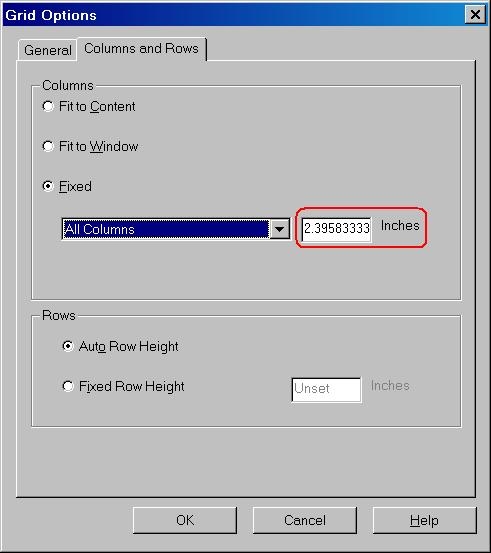
CAUSE:
The product is working as designed. The reason why the value changes is because the value inputted as inches is converted into pixels when calculating width and height. The number of pixel points is an integer, not a decimal. So, a fractional input value in inches (e.g. 2.4) will be converted and rounded into pixels (integer value), and then converted back and shown as inches. After the conversion, the inches may not match exactly to the number before the conversion.
ACTION:
An enhancement request has been submitted to show the pixel display. Contact Strategy Technical Support for an update on the status of this enhancement request.
