By using a transform, metric headers can be modified to display the formula of simple metrics with the metric name when executing reports in Strategy Web
NOTE: This customization will only work for metrics that do not contain prompts. Only the formula will be displayed and not the filtering criteria or level, as shown below:
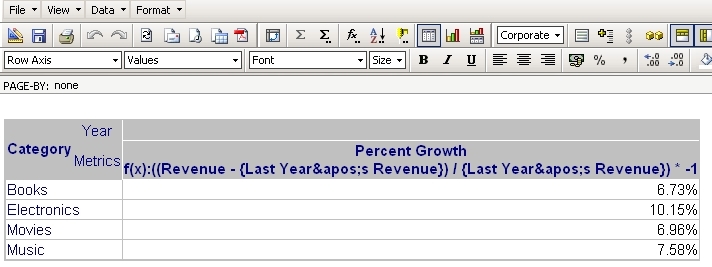
To achieve this customization, follow the steps below:
package com.Strategy.sdk.transforms;

import com.Strategy.web.app.transforms.ReportGridCellColHeaderImpl;
import com.Strategy.web.beans.MarkupOutput;
import com.Strategy.web.beans.ViewBean;
import com.Strategy.web.objects.WebHeader;
import com.Strategy.web.objects.WebMetric;
import com.Strategy.web.objects.WebMetricHeader;
import com.Strategy.web.objects.WebObjectSource;
import com.Strategy.webapi.EnumDSSXMLObjectFlags;
import com.Strategy.webapi.EnumDSSXMLObjectTypes;

public class RevenueReportGridCellColHeaderImpl extends ReportGridCellColHeaderImpl {

    public RevenueReportGridCellColHeaderImpl() {
        super();

    }

    public void generateText(MarkupOutput mo) {
        String colHeader = getText();
        WebHeader header = getWebHeader();
        ViewBean rb = (ViewBean) this.getBaseBean();
        WebObjectSource wos = rb.getSessionInfo().getFactory().getObjectSource();

        try {
            String userName = rb.getSessionInfo().getUserInfo().getDisplayName();

            if (userName.equals("Administrator")) {
                try {
                    WebMetricHeader wmh = (WebMetricHeader) header;
                    WebMetric wm;

                    wm = wmh.getWebMetric();
                    wos.setFlags(EnumDSSXMLObjectFlags.DssXmlObjectDefn);
                    WebMetric woi = (WebMetric) wos.getObject(wm.getID(), EnumDSSXMLObjectTypes.DssXmlTypeMetric, true);

                    mo.append(colHeader);
                    mo.append("<br>f(x):" + extractFormula(woi.getXML(), "exp"));

                } catch (IllegalArgumentException e) {
                    e.printStackTrace();
                } catch (IllegalStateException e) {
                    e.printStackTrace();
                } catch (IndexOutOfBoundsException e) {
                    e.printStackTrace();
                } catch (Exception e) {
                    e.printStackTrace();
                }

            } else {
                mo.append(colHeader);
            }
        } catch (Exception e) {
            e.printStackTrace();
        }
    }

    private String extractFormula(String mXml, String tagName) {
        String metricXml = mXml;
        String tagValue;

        if (metricXml.indexOf("<" + tagName) != -1) {
            int startFormulaTag = metricXml.indexOf("<" + tagName);
            int startFormulaText = metricXml.indexOf(">", startFormulaTag) + 1;
            int endFormulaText = metricXml.indexOf("<", startFormulaText);

            tagValue = metricXml.substring(startFormulaText, endFormulaText);
        } else {
            tagValue = "No Metric Formula";
        }

        return tagValue;
    }
}The code provided only displays the metric formula when the administrator user is logged in.
Customization Code Warning:
This customization is provided as a convenience to Strategy users and is only directly applicable to the version stated. While this code may apply to other releases directly, Strategy Technical Support makes no guarantees that the code provided will apply to any future or previous builds. In the event of a code change in future builds, Strategy may not be able to provide additional code on this matter even though this customization is provided at this time for this specific build.
