EducationSoftwareStrategy.com
StrategyCommunity

Knowledge Base

Product

Community

Knowledge Base

TopicsBrowse ArticlesDeveloper Zone

Product

Download SoftwareProduct DocumentationSecurity Hub

Education

Tutorial VideosSolution GalleryEducation courses

Community

GuidelinesGrandmastersEvents
x_social-icon_white.svglinkedin_social-icon_white.svg
Strategy logoCommunity

© Strategy Inc. All Rights Reserved.

LegalTerms of UsePrivacy Policy
  1. Home
  2. Topics

KB14828: What functionality does the ‘Purge Server Object Caches’ setting achieve in MicroStrategy Intelligence Server 10.x


Community Admin

• Strategy


What functionality does the ‘Purge Server Object Caches’ setting achieve in MicroStrategy Intelligence Server 10.x

The 'Purge Server Object Caches' setting is exposed in Strategy Developer 10.x and is accessed as follows:
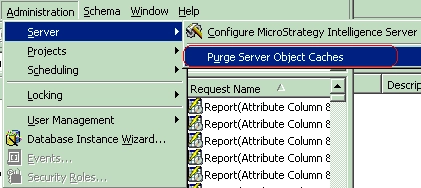
 

  • In Strategy Developer 10.x, login to the 3-tier project source.
  • Go to the 'Administration' menu.
  • Go to Server -> Purge Server Object Caches, as shown below:
ka04W000000OhiQQAS_0EM440000002BaK.gif

The 'Purge Server Object Caches' setting purges the server-side object cache for configuration objects. Configuration objects are essentially server-level objects such as users, schedules, schedule requests etc.
 
NOTE: There are two types of server-side object caches - one for schema and application objects and the other for configuration objects. The former are project-level objects while the latter are server-level objects. Refer to the following Strategy Knowledge Base technical note for additional details concerning these two types of object caches:
 
KB14815 (KB5300-8X-0849) - What are the different settings governing server-side object cache usage in Strategy Intelligence Server


Comment

0 comments

Details

Knowledge Article

Published:

April 20, 2017

Last Updated:

April 20, 2017