VLDB properties are available at multiple levels so that SQL generated for one report can be manipulated separately from the SQL generated for another similar report. This flexibility is an important benefit of VLDB properties because it permits adjustment of many levels such as:
The chart below shows the order of precedence of the VLDB properties:
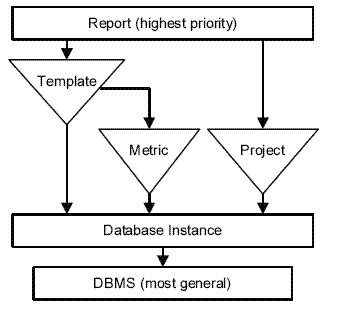
The arrows depict the override authority of the levels, with the report level having the greatest authority. For example, if a VLDB property is set one way for a report and the same property is set differently for a metric included on the report, the report property takes the precedence.
Conversely, if the VLDB property at the report level is set to use the default inherited value, the project level setting is used. If that level is also set to the default or if the VLDB property is not set at project level, the setting at the database instance is used. This information is available for each property in the VLDB properties dialog box at each level. The Use default inherited value option indicates the level is active, while the SQL preview box displays a description of the selected setting. The VLDB properties at the different levels work together to affect report results; however, there is a different interface for each level.
For more details, go to Start -> Programs -> Strategy -> Product Manuals -> Advanced Reporting Guide (PDF) -> 13. VLDB Properties.
