EducationSoftwareStrategy.com
StrategyCommunity

Knowledge Base

Product

Community

Knowledge Base

TopicsBrowse ArticlesDeveloper Zone

Product

Download SoftwareProduct DocumentationSecurity Hub

Education

Tutorial VideosSolution GalleryEducation courses

Community

GuidelinesGrandmastersEvents
x_social-icon_white.svglinkedin_social-icon_white.svg
Strategy logoCommunity

© Strategy Inc. All Rights Reserved.

LegalTerms of UsePrivacy Policy
  1. Home
  2. Topics

KB14832: How to increase the size of any log file, such the DSSErrors.log, in order to store a larger amount of data


Community Admin

• Strategy


The default log files in Strategy come with a fixed size value, roughly 2048KB, and when this limit is reached, the file is overwritten by new information. This forces the users who want to keep historical data to save a lot of files. However, the size of file can be altered by following steps below (the DSSErrors.log is used in this example):
  • On the Strategy Intelligence Server Machine, go to Start -> Programs -> Strategy Tools -> Diagnostics Configuration.
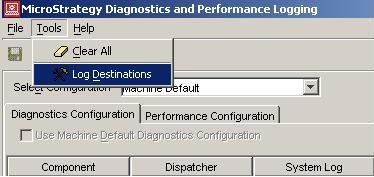
  • Go to the Tools menu and choose 'Log Destinations', as shown below:
ka0PW0000002pknYAA_0EM440000002JIu.jpeg
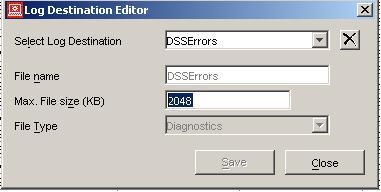
  • Choose the desired log file and increase the parameter 'Max. File Size (KB)', as shown below:
ka0PW0000002pknYAA_0EM440000002JIt.jpeg

Comment

0 comments

Details

Knowledge Article

Published:

May 18, 2017

Last Updated:

July 26, 2024