SYMPTOM:
The Strategy Enterprise Manager data load is unable to complete. The following sequence of messages can be observed in the MSTRMigration.log:
Sample Code/Error
#####################################################################################
-------------------------------------------------------------------------------------
Strategy Incorporated - Enterprise Manager
9.4.1 (9.4.1010.0103)
This is an activity log for the Data Migration component of Enterprise Manager.
6/20/2014 2:23:00 PM
---------------------------------------------------------
Data Migration Process.
---------------------------------------------------------
6/20/2014 2:23:00 PM 1 Intelligence Servers listed in Database.
6/20/2014 2:23:01 PM Timestamp verified.
6/20/2014 2:23:01 PM Creating new timestamp.
6/20/2014 2:23:01 PM Success writing timestamp.
---------------------------------------------------------
Migration Window: Window Begin = 6/20/2014 2:16:05 PM; Window End = 6/20/2014 2:22:26 PM.
---------------------------------------------------------
6/20/2014 2:23:01 PM Begin metadata migrations.
6/20/2014 2:23:01 PM 1 components tracked.
6/20/2014 2:23:01 PM 28 items tracked.
6/20/2014 2:23:02 PM Project 'Strategy Tutorial' loaded on:
6/20/2014 2:23:02 PM ASVR-2K8-DBG5 (port number=34952, load=2)
6/20/2014 2:23:02 PM Selected ASVR-2K8-DBG5 for the connection.
6/20/2014 2:23:03 PM No server is available to connect to Strategy Tutorial
6/20/2014 2:23:03 PM WARNING: Cannot load data from Project Strategy Tutorial. This could be because the Project is unloaded, idle or was deleted.
6/20/2014 2:23:03 PM End metadata migrations.
6/20/2014 2:23:03 PM No server is available to connect to Strategy Tutorial
6/20/2014 2:23:03 PM There was a failure during the process:
If a manual data load is executed in the Strategy Enterprise Manager 9.x console, the following error appears:
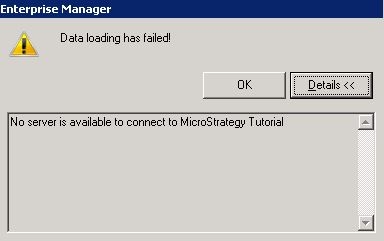
Data loading has failed!
No server is available to connect to Strategy Tutorial
CAUSE:
This issue may occur when the domain name server for the Strategy Enterprise Manager machine does not recognize the unqualified machine name for the Strategy Intelligence Server
It can also occur against Strategy Intelligence Server using the default port as well.
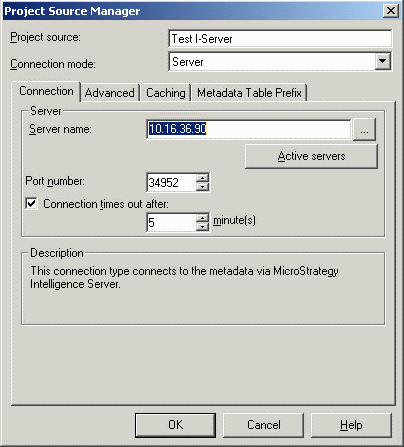
At the beginning of the data load process, the Strategy Enterprise Manager data loader must connect to the Strategy Intelligence Server. The initial connection is established using the exact machine identifier stored in the project source on the Strategy Enterprise Manager machine. This identifier may be a fully qualified machine name (for example, machine.domain.Strategy.com), a simple machine name (machine), or an IP address, as shown below:
For each project registered under that Strategy Intelligence Server in the Strategy Enterprise Manager console, the data loader must login to the project for metadata migration. At this stage, the simple machine name is used. This is what is saved in the EM_PROPS table irrespective of the definition of the project source.
It is expected that in most environments, the domain name server (DNS) will be able to identify the machine based solely on the machine name. If this recognition fails, the project login will also fail and the above message will be recorded.
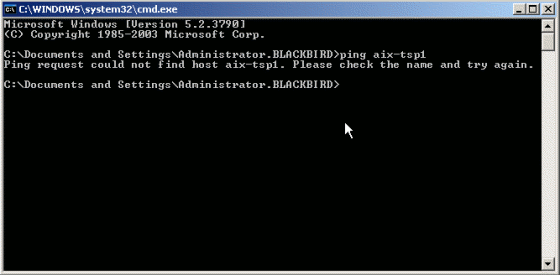
The scenario may be verified by pinging the Strategy Intelligence Server by name from the Microsoft Windows command line on the Strategy Enterprise Manager machine, as shown below: