EducationSoftwareStrategy.com
StrategyCommunity

Knowledge Base

Product

Community

Knowledge Base

TopicsBrowse ArticlesDeveloper Zone

Product

Download SoftwareProduct DocumentationSecurity Hub

Education

Tutorial VideosSolution GalleryEducation courses

Community

GuidelinesGrandmastersEvents
x_social-icon_white.svglinkedin_social-icon_white.svg
Strategy logoCommunity

© Strategy Inc. All Rights Reserved.

LegalTerms of UsePrivacy Policy
  1. Home
  2. Topics

KB14902: How to make a graph scaling to start from zero in MicroStrategy Developer


Stefan Zepeda

Salesforce Solutions Architect • Strategy


How to make a graph scaling to start from zero in MicroStrategy Developer

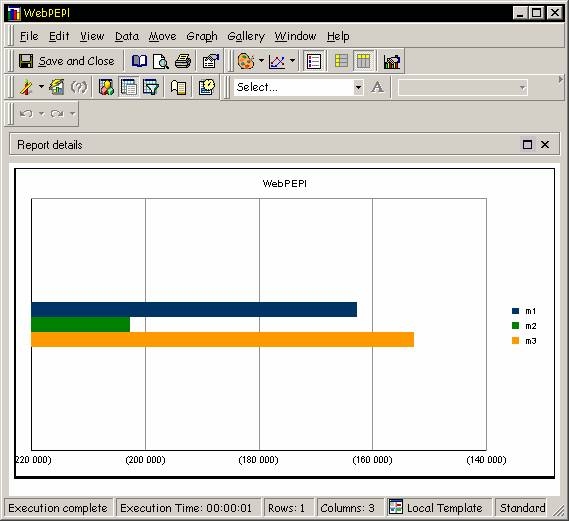
A user creates a report and displays it as a horizontal bar graph in Strategy Developer, as shown below:
 

ka02R000000kXHvQAM_0EM440000002FL7.jpeg

 
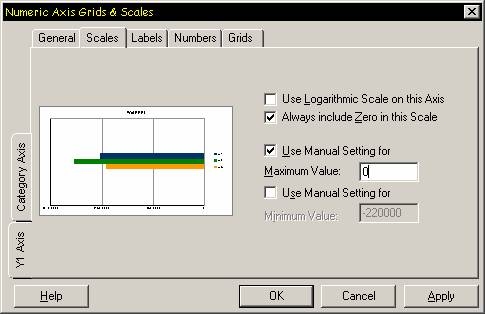
Zero is not included in the graph. Scaling can be made to start from zero by setting the 'Use manual setting for' to 0 from the Numeric Axis Grid and Scales dialog box > Y1 Axis-> Scales, as shown below:
 

ka02R000000kXHvQAM_0EM440000002FL3.jpeg

 
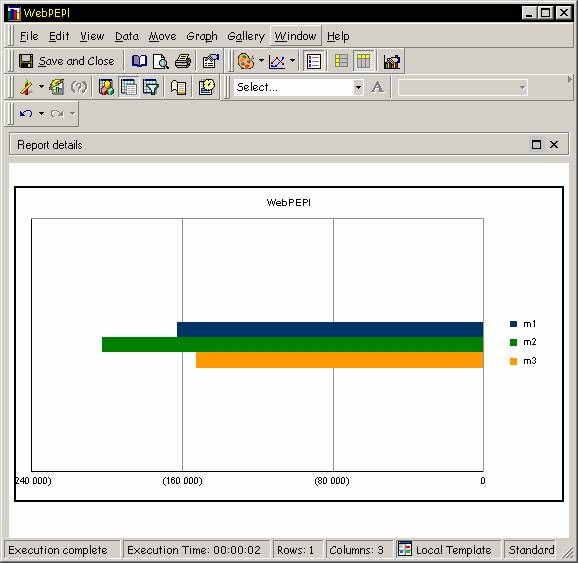
The grid scales now start from zero, as shown below:
 

ka02R000000kXHvQAM_0EM440000002FLB.jpeg


Comment

0 comments

Details

Knowledge Article

Published:

June 19, 2017

Last Updated:

June 19, 2017