EducationSoftwareStrategy.com
StrategyCommunity

Knowledge Base

Product

Community

Knowledge Base

TopicsBrowse ArticlesDeveloper Zone

Product

Download SoftwareProduct DocumentationSecurity Hub

Education

Tutorial VideosSolution GalleryEducation courses

Community

GuidelinesGrandmastersEvents
x_social-icon_white.svglinkedin_social-icon_white.svg
Strategy logoCommunity

© Strategy Inc. All Rights Reserved.

LegalTerms of UsePrivacy Policy
  1. Home
  2. Topics

KB14933: The Read Settings 'Settings' option for customizing the Warehouse Catalog is grayed out in MicroStrategy Developer 9.4.x - 10.x


Stefan Zepeda

Salesforce Solutions Architect • Strategy


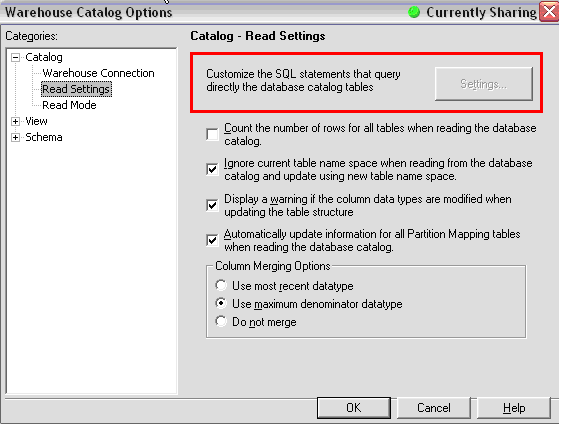
This technical note describes a behavior observed when using certain database instance types, where the Catalog Read Settings are greyed out.

SYMPTOM:
When users open the Warehouse Catalog and try to access the Read Settings option 'Settings' in Strategy Developer, the option is greyed out as displayed below:
 

ka02R000000kaLWQAY_0EM440000002FLZ.jpeg

 
CAUSE:
For certain database types, for example Microsoft Access and Netezza, Strategy does not use SQL statements to retrieve table and column information from the Warehouse Catalog - it uses ODBC calls instead. 
Note that Microsoft Access is not supported or certified as a production environment warehouse. It should only be used for demonstration purposes such as the Strategy Tutorial project.
 
ACTION:
If users experience issues with retrieving tables from the Warehouse, specifically with Netezza, there may be issues with the driver. Contact Strategy Technical Support for more assistance.


Comment

0 comments

Details

Knowledge Article

Published:

May 8, 2017

Last Updated:

May 8, 2017