EducationSoftwareStrategy.com
StrategyCommunity

Knowledge Base

Product

Community

Knowledge Base

TopicsBrowse ArticlesDeveloper Zone

Product

Download SoftwareProduct DocumentationSecurity Hub

Education

Tutorial VideosSolution GalleryEducation courses

Community

GuidelinesGrandmastersEvents
x_social-icon_white.svglinkedin_social-icon_white.svg
Strategy logoCommunity

© Strategy Inc. All Rights Reserved.

LegalTerms of UsePrivacy Policy
  1. Home
  2. Topics

KB14950: ‘Could not display "objectWebSubs" using "ObjectInfoStyle" as style’ or ‘The object does not exist in the metadata’ error occurs when attempting to subscribe to a Report Services document in MicroStrategy Web 9.x


Community Admin

• Strategy


‘Could not display "objectWebSubs" using "ObjectInfoStyle" as style’ or ‘The object does not exist in the metadata’ error occurs when attempting to subscribe to a Report Services document in MicroStrategy Web 9.x

SYMPTOM:
In Strategy Web 9.x, users may be presented with specific errors if they attempt to subscribe to a Report Services document that they do not have browse access to.
 
STEPS TO REPRODUCE:
Follow the steps below to reproduce this issue in the Strategy Tutorial project:
 

  • Create a Report Services document and deny a web user Browse access to it, as shown below:
ka04W000000OceYQAS_0EM4400000028qu.jpeg
  • As the user will not be able to navigate to the document through Strategy Web 9.x, create a link to the document using the URL API, similar to the one shown below:
    http://localhost/MicroStrategy/asp/Main.aspx?evt=2048001&documentID=46444B68460E2F1498123981F17398CD&uid=a&pwd=&server=localhost&project=Strategy+Tutorial
  • The user should be able to execute the document by accessing the URL, as shown below:
ka04W000000OceYQAS_0EM4400000028qw.jpeg
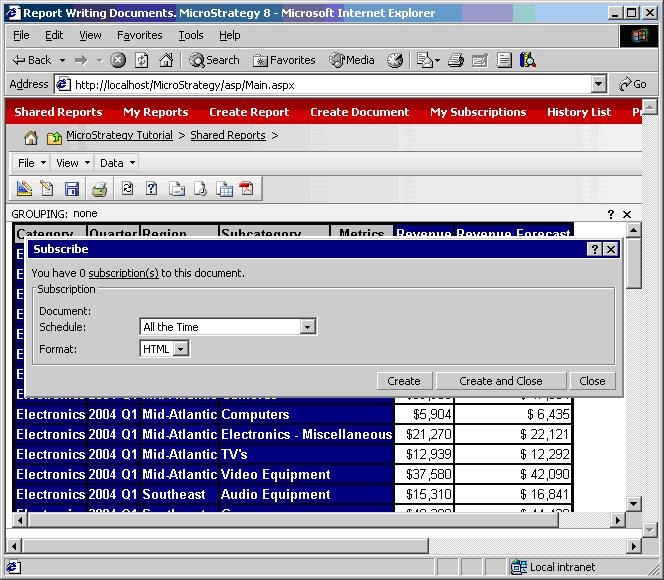
  • Click on the Subscribe button. The following dialog window will appear:
ka04W000000OceYQAS_0EM4400000028qr.jpeg
  • If the subscriptions hyperlink is clicked, the following error message will be displayed:
ka04W000000OceYQAS_0EM4400000028qv.jpeg
  •  
    Unexpected Error when displaying WebBean
    Could not display "objectWebSubs" using "ObjectInfoStyle" as style
  • If in the dialog window the Create button is clicked instead, the subscription will be created successfully, but users will be presented with the following error when accessing the My Subscriptions page:
ka04W000000OceYQAS_0EM4400000028qt.jpeg
  •  
    The object does not exist in the metadata.

CAUSE:
This working as designed. If a user does not have browse access to a document in Strategy Web 9.x, then the user should not be able to view a subscription to the document either. However, the error messages are not intuitive, and an enhancement request has been logged for more informative error messages.
 
ACTION:
Contact Strategy Technical Support for an update on the status of this issue.
 
WORKAROUND:
Enable browse access for the user to the document.


Comment

0 comments

Details

Knowledge Article

Published:

July 16, 2017

Last Updated:

July 16, 2017