EducationSoftwareStrategy.com
StrategyCommunity

Knowledge Base

Product

Community

Knowledge Base

TopicsBrowse ArticlesDeveloper Zone

Product

Download SoftwareProduct DocumentationSecurity Hub

Education

Tutorial VideosSolution GalleryEducation courses

Community

GuidelinesGrandmastersEvents
x_social-icon_white.svglinkedin_social-icon_white.svg
Strategy logoCommunity

© Strategy Inc. All Rights Reserved.

LegalTerms of UsePrivacy Policy
  1. Home
  2. Topics

KB15007: ‘Error in layout /WEB-INF/xml/layouts/ReportGridLayout.xml:line27: Inside tag:.....,caused by java.lang.IndexOutofBoundsException: Index: 0, Size: 0’ error occurs when executing a freeform SQL report in MicroStrategy Web 9.x


Community Admin

• Strategy


This technical note describes an issue when executing a Freeform SQL report in MicroStrategy Web 9.x where the user receives the error "Error in layout /WEB-INF/xml/layouts/ReportGridLayout.xml:line27: Inside tag:.....,caused by java.lang.IndexOutofBoundsException: Index: 0, Size: 0". The issue occurs because one of the attributes on the Freeform SQL report does not have any attribute forms associated with it on the template. Follow the steps in this technical note to resolve the issue.

SYMPTOM:
When user executes a Freeform SQL report in Strategy Web 9.x, the following error occurs:
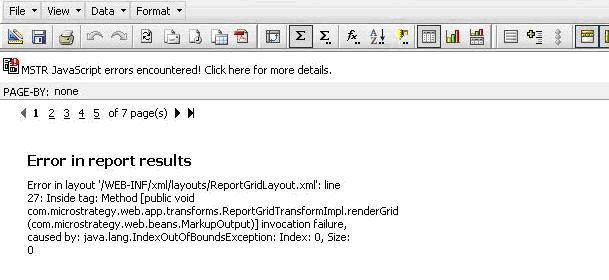
ka04W000000OgZ2QAK_0EM4400000028qR.gif

 
Error in report results
Error in layout `/WEB-INF/xml/layouts/ReportGridLayout.xml`:line27: Inside tag: Method invocation failure, caused by java.lang.IndexOutofBoundsException: Index: 0, Size: 0
CAUSE:
The issue occurs because one of the attributes on the Freeform SQL report does not have any attribute forms associated with it on the template. This issue occurs when the default browse form is not being mapped in the freeform SQL report. For example, the DESC form is the default browse form; however, only the ID form is being mapped in the report. Normally in this scenario, the ID form is set as template display form. Strategy Technical Support is currently investigating how the Freeform SQL report was able to get in this status where the attribute does not have any attribute form associated with it on the template. Contact Strategy Technical Support for an update on the status of this issue.
ACTION:
This issue can be resolved by following the steps below:
  • Login to Strategy Desktop 9.x and edit the freeform SQL report.
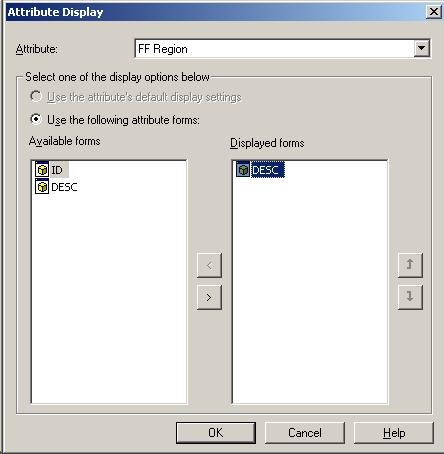
  • Go to Data > Attribute Display and check the form that is selected as the displayed form. In this case, only the DESC form is selected, as shown below:
ka04W000000OgZ2QAK_0EM4400000028qT.jpeg
  • Click on Cancel and go to the Freeform SQL definition of the report.
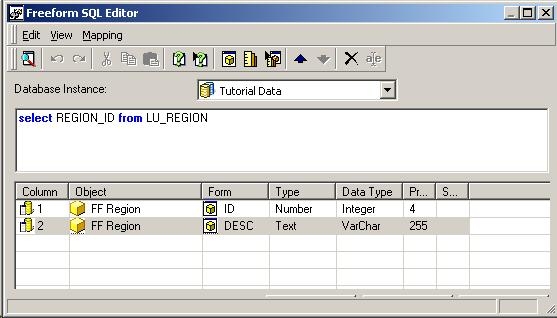
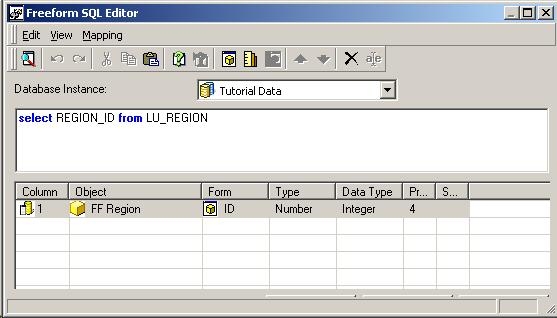
  • In the freeform SQL definition, only the ID form of the FF Region attribute is mapped, as shown below:
ka04W000000OgZ2QAK_0EM4400000028qU.jpeg
  • Add a DESC attribute form to the report and name it FF Region as well. Thus, the DESC form is also mapped in the freeform SQL report, as shown below:
ka04W000000OgZ2QAK_0EM4400000028qS.jpeg
  • Click OK so that the freeform SQL definition is saved.
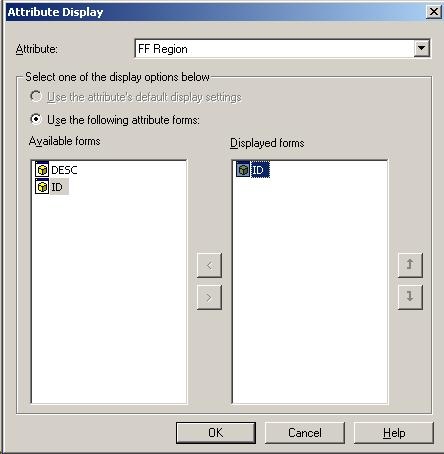
  • Go back to Data > Attribute Display and now the DESC form can be removed from the displayed forms section. Now, add the ID form to the displayed forms section, as shown below, and click OK:
ka04W000000OgZ2QAK_0EM4400000028qW.jpeg
  • Go back to the Freeform SQL definition and remove the DESC form that was added in step five from the report. Click OK to save the Freeform SQL definition. Save and close the Freeform SQL report.
  • Now, login to Strategy Web 9.x and execute the report. The report will execute successfully without receiving any error messages.

Comment

0 comments

Details

Knowledge Article

Published:

June 14, 2017

Last Updated:

June 14, 2017