EducationSoftwareStrategy.com
StrategyCommunity

Knowledge Base

Product

Community

Knowledge Base

TopicsBrowse ArticlesDeveloper Zone

Product

Download SoftwareProduct DocumentationSecurity Hub

Education

Tutorial VideosSolution GalleryEducation courses

Community

GuidelinesGrandmastersEvents
x_social-icon_white.svglinkedin_social-icon_white.svg
Strategy logoCommunity

© Strategy Inc. All Rights Reserved.

LegalTerms of UsePrivacy Policy
  1. Home
  2. Topics

KB15043: Renaming a MicroStrategy Logical Table is not reflected in the Table Editor’s Physical View in MicroStrategy Developer 9.x


Stefan Zepeda

Salesforce Solutions Architect • Strategy


KB15043: Renaming a MicroStrategy Logical Table is not reflected in the Table Editor’s Physical View in MicroStrategy Developer 9.x

SYMPTOM:
Renaming a Strategy Logical Table is not reflected in the Table Editor's Physical View in Strategy Developer 9.x.
 
STEPS TO REPRODUCE:
Follow the steps below to reproduce this issue in the Strategy Tutorial project:
 

  • Create a Strategy Logical Table.
  • Save and close the Logical Table as 'New_1.'
  • In Strategy Desktop 9.x, rename the Logical Table 'New_1' to 'New_33.'
  • Open up the Logical Table editor, and click the Physical View tab. Notice that the table is not renamed.
  • Create a new Logical Table and save it with the name of the original Logical Table, 'New_1,' as shown below:
ka02R000000kbsDQAQ_0EM440000002FLy.jpeg
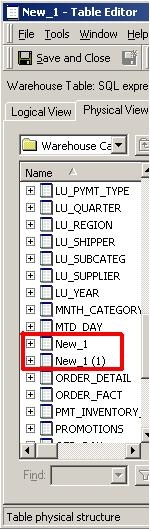
  • Open up the Logical Table editor again, and click the Physical View tab. Notice that the table is still not renamed, and the new table has taken the name 'New_1 (1),' as shown below:
ka02R000000kbsDQAQ_0EM440000002FLc.jpeg

CAUSE:
This is a known issue in Strategy Developer 9.x.
 
ACTION:
Contact Strategy Technical Support for an update on the status of this issue.


Comment

0 comments

Details

Knowledge Article

Published:

June 7, 2017

Last Updated:

June 7, 2017