EducationSoftwareStrategy.com
StrategyCommunity

Knowledge Base

Product

Community

Knowledge Base

TopicsBrowse ArticlesDeveloper Zone

Product

Download SoftwareProduct DocumentationSecurity Hub

Education

Tutorial VideosSolution GalleryEducation courses

Community

GuidelinesGrandmastersEvents
x_social-icon_white.svglinkedin_social-icon_white.svg
Strategy logoCommunity

© Strategy Inc. All Rights Reserved.

LegalTerms of UsePrivacy Policy
  1. Home
  2. Topics

KB15053: ‘No Object Repository is configured. Cannot establish a connection to it’ error occurs when attempting to access the Subscription Book page in the MicroStrategy Narrowcast Server 8.1.x System Configuration Wizard


Community Admin

• Strategy


Article outline why the message ‘No Object Repository is configured. Cannot establish a connection to it’ error occurs when attempting to access the Subscription Book page in the MicroStrategy Narrowcast Server System Configuration Wizard

SYMPTOM:
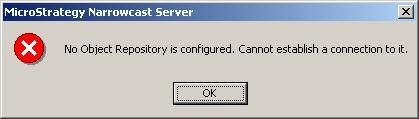
After clicking the title Subscription Book in the Strategy Narrowcast Server System Configuration Wizard, the following error occurs:
 

ka04W000000OgjSQAS_0EM440000002BYX.jpeg

No Object Repository is configured. Cannot establish a connection to it.
 
CAUSE:
The error occurs because the domain user attempting to configure the Strategy Narrowcast Server 8.1.x system does not have the correct Administrator privileges set.
 
ACTION:
In order to resolve this error the user must be granted Administrator access on both the system level and the Strategy Narrowcast Server  level. To do this, follow the steps below:
 

  • Add the domain user to the Administrator group on the Strategy Narrowcast Server  machine or grant the respective DCOM permissions.
  • Grant the domain user the System Administrator privilege for the Strategy Narrowcast Server 8.1.x repository.
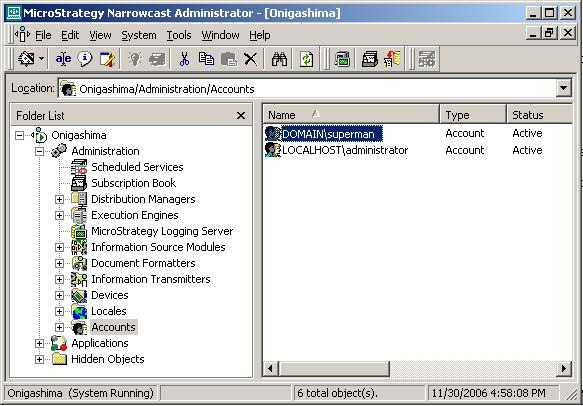
    • Open the Strategy Narrowcast Administrator console.
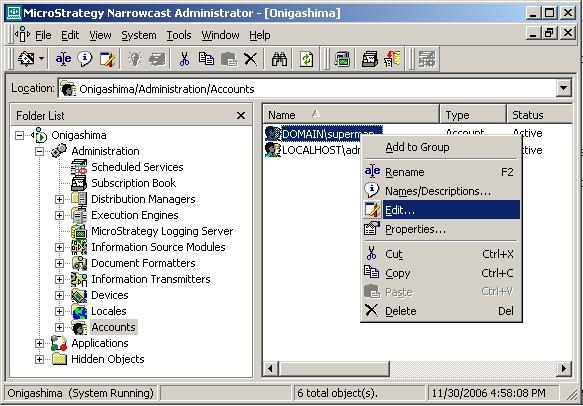
    • Navigate to the user, as shown below:
ka04W000000OgjSQAS_0EM440000002BYW.jpeg
    • Right-click on the desired user and select Edit as shown below:
ka04W000000OgjSQAS_0EM440000002BYV.jpeg
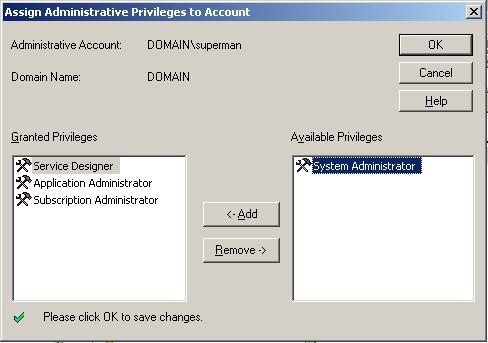
    • In the right side column, under Available Privileges, select the System Administrator privilege. Click <- Add to grant the privilege, as shown below:
ka04W000000OgjSQAS_0EM440000002BYb.jpeg
    • Click OK to save the new privilege for the user.

WORKAROUND:
Users who do not have administrative access should use the Register Existing System... option. This will simply register the Strategy Narrowcast system on the computer and will not attempt any configuration for that system. If the user experiences the above error while doing a Configure New System... or Edit Existing System, simply close the System Configuration Wizard and the system will still be registered.
 
Refer to the following Strategy Knowledge Base technical notes for more information:
 
KB10646: How to set the DCOM settings for remote administration of MicroStrategy Narrowcast Server on a Windows 2003 Server machine
 
KB5074: How to administer MicroStrategy Narrowcast Server from a remote machine


Comment

0 comments

Details

Knowledge Article

Published:

June 12, 2017

Last Updated:

June 12, 2017