EducationSoftwareStrategy.com
StrategyCommunity

Knowledge Base

Product

Community

Knowledge Base

TopicsBrowse ArticlesDeveloper Zone

Product

Download SoftwareProduct DocumentationSecurity Hub

Education

Tutorial VideosSolution GalleryEducation courses

Community

GuidelinesGrandmastersEvents
x_social-icon_white.svglinkedin_social-icon_white.svg
Strategy logoCommunity

© Strategy Inc. All Rights Reserved.

LegalTerms of UsePrivacy Policy
  1. Home
  2. Topics

KB15076: ‘Filter definition can not be defined in terms of itself’ error occurs when dragging a filter into the Report Filter window in MicroStrategy Developer


Stefan Zepeda

Salesforce Solutions Architect • Strategy


This article notes an error that can be seen adding filters to a report in Developer

SYMPTOM:
 
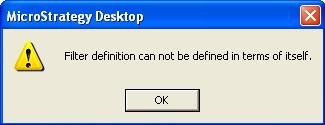
When dragging a filter into the Report Filter window, the following error occurs in Strategy Developer:
 

ka02R000000kbuDQAQ_0EM440000002FLm.jpeg

 
Filter definition can not be defined in terms of itself.
 
STEPS TO REPRODUCE:
 
Follow the steps below to reproduce this issue in the Strategy Tutorial project:
 

  1. Add the filter 'Year = 2004' as a shortcut to the Report Filter window.
  2. Drag and drop the filter 'Year = 2004' onto the report window.

OR
 

  1. Add the filter 'Year = 2004' as a shortcut to the Report Filter window.
  2. Remove the filter 'Year = 2004' from the Report Filter window, either by dragging it off or by right-clicking and selecting 'Remove.'
  3. Drag and drop the filter 'Year = 2004' onto the report window.

The error described above will appear.
 
CAUSE:
 
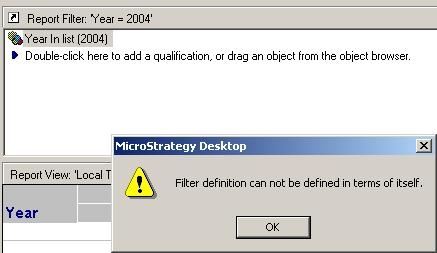
This error message appears because the filter that is added to the Report Filter already exists as a 'shortcut to a filter' in the Report Filter window, as shown below:
 

ka02R000000kbuDQAQ_0EM440000002FLo.jpeg

 
ACTION:
 
Instead of dragging and dropping the filter 'Year = 2004' into the Report Filter window, right-click and select either 'Replace Report Filter with a shortcut to this filter' or 'Replace Report Filter with a copy of this filter.' The error will not occur.


Comment

0 comments

Details

Knowledge Article

Published:

June 6, 2017

Last Updated:

June 6, 2017