EducationSoftwareStrategy.com
StrategyCommunity

Knowledge Base

Product

Community

Knowledge Base

TopicsBrowse ArticlesDeveloper Zone

Product

Download SoftwareProduct DocumentationSecurity Hub

Education

Tutorial VideosSolution GalleryEducation courses

Community

GuidelinesGrandmastersEvents
x_social-icon_white.svglinkedin_social-icon_white.svg
Strategy logoCommunity

© Strategy Inc. All Rights Reserved.

LegalTerms of UsePrivacy Policy
  1. Home
  2. Topics

KB15084: All attributes browse forms are not displayed in the Summary page of a prompt selection in MicroStrategy Developer


Stefan Zepeda

Salesforce Solutions Architect • Strategy


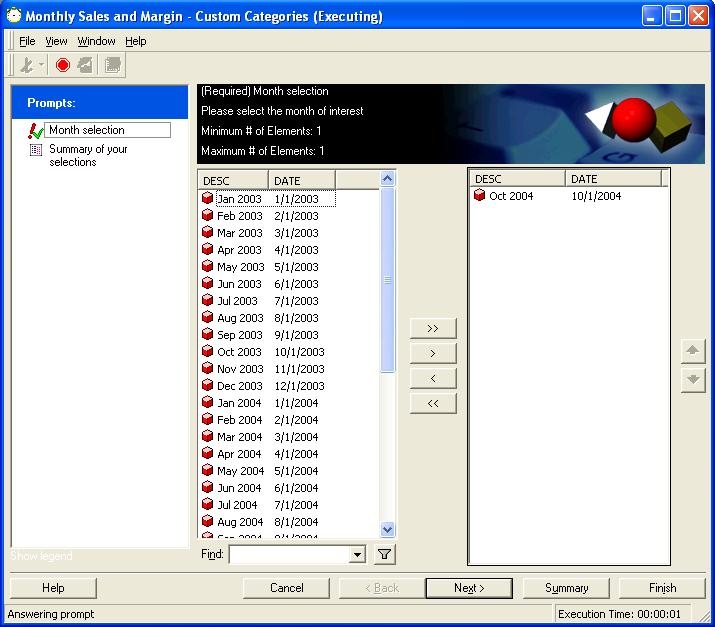
A prompt with more than one attribute browse form displayed in MicroStrategy Developer does not display all the attribute browse forms in the Summary window.

SYMPTOM:
A user has created a prompt with more than one attribute browse form displayed in Strategy Developer, as shown below:
 

ka02R000000kbrkQAA_0EM440000002FKN.jpeg

 
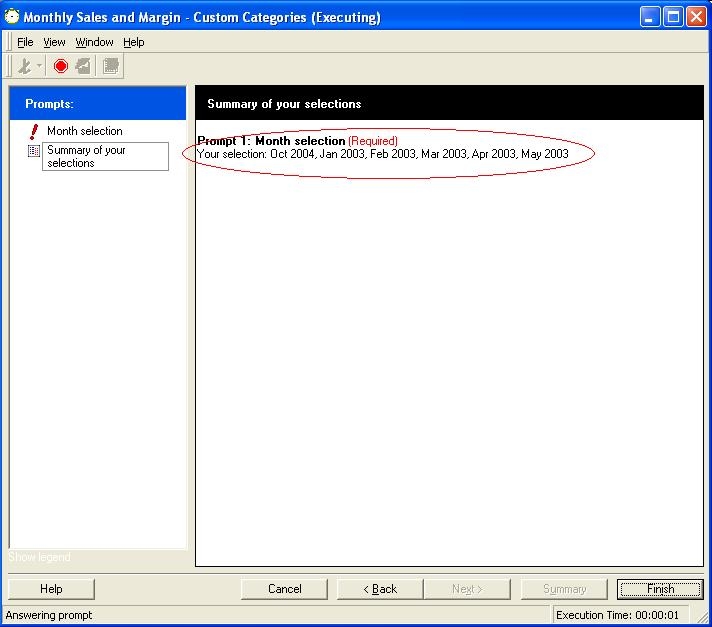
After making the prompt selections, the Summary window will not display all the attribute browse forms that were originally displayed for making the prompt selection. This can be observed as highlighted with a red circle on the screenshot below:
 

ka02R000000kbrkQAA_0EM440000002FKB.jpeg

 
CAUSE:
This is working as designed. An enhancement request has been logged with Strategy Technology to give users the option to display the entire list.
 
ACTION:
Strategy will continue to investigate and post updates as soon as they are available.


Comment

0 comments

Details

Knowledge Article

Published:

June 7, 2017

Last Updated:

June 7, 2017