EducationSoftwareStrategy.com
StrategyCommunity

Knowledge Base

Product

Community

Knowledge Base

TopicsBrowse ArticlesDeveloper Zone

Product

Download SoftwareProduct DocumentationSecurity Hub

Education

Tutorial VideosSolution GalleryEducation courses

Community

GuidelinesGrandmastersEvents
x_social-icon_white.svglinkedin_social-icon_white.svg
Strategy logoCommunity

© Strategy Inc. All Rights Reserved.

LegalTerms of UsePrivacy Policy
  1. Home
  2. Topics

KB15095: How to toggle the Preferences > Change Password option in MicroStrategy Web


Community Admin

• Strategy


How to toggle the Preferences > Change Password option in MicroStrategy Web.

In Strategy Web 9.0 Preferences, users can be given the option to change their passwords, as shown below:


ka04W000000OgF8QAK_0EM4400000028qE.jpeg


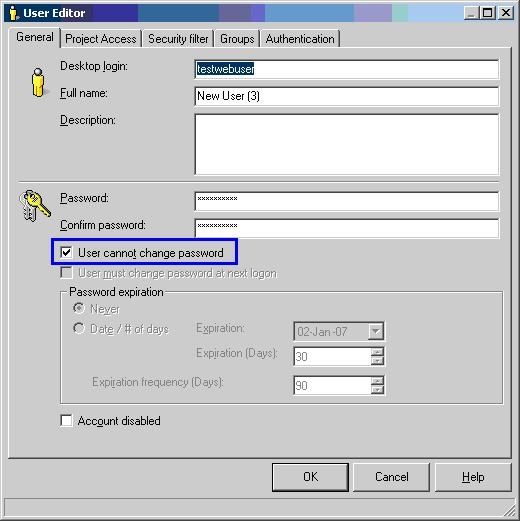
This option is tied to the 'User cannot change Password' setting in the User Editor, as shown below:
 

ka04W000000OgF8QAK_0EM4400000028qA.jpeg

 
If the setting is checked, the link will be removed from the Preferences menu.


Comment

0 comments

Details

Knowledge Article

Published:

June 16, 2017

Last Updated:

June 16, 2017