The following settings would allow the Strategy Web and Desktop 8.x applications to retrieve UTF8 encoded characters intact from a MySQL database:
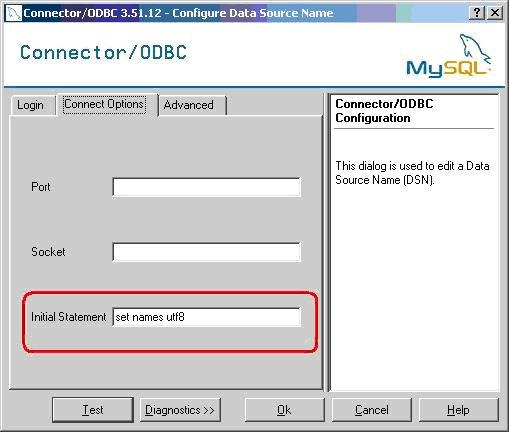
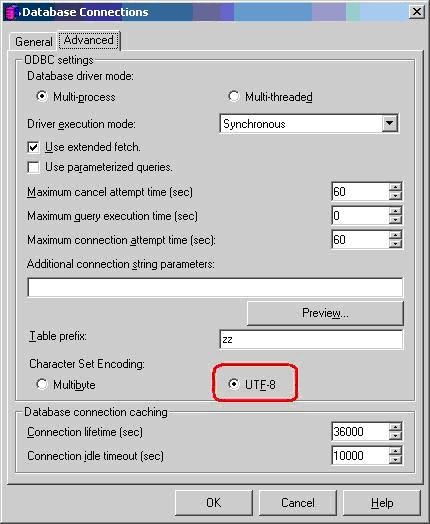
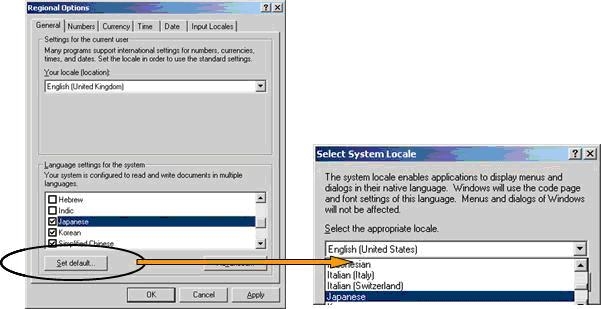
The steps above will allow the Strategy Web 8.x user to be able to view the UTF-8 encoded characters correctly. To allow Strategy Desktop 8.x users on non-native OS versions to view the characters, an additional configuration must be made on the client machine itself. Change the Microsoft Windows machine where the Strategy Desktop 8.x client is running to a default language of Japanese (or the required language) under Control Panel > Regional Options, as shown below:
Third Party Software Installation:
WARNING:
The third-party product(s) discussed in this technical note is manufactured by vendors independent of Strategy. Strategy makes no warranty, express, implied or otherwise, regarding this product, including its performance or reliability.
