EducationSoftwareStrategy.com
StrategyCommunity

Knowledge Base

Product

Community

Knowledge Base

TopicsBrowse ArticlesDeveloper Zone

Product

Download SoftwareProduct DocumentationSecurity Hub

Education

Tutorial VideosSolution GalleryEducation courses

Community

GuidelinesGrandmastersEvents
x_social-icon_white.svglinkedin_social-icon_white.svg
Strategy logoCommunity

© Strategy Inc. All Rights Reserved.

LegalTerms of UsePrivacy Policy
  1. Home
  2. Topics

KB15169: How to create a report that shows subtotals in the middle of the report between certain attributes elements with outline mode in MicroStrategy Developer


Stefan Zepeda

Salesforce Solutions Architect • Strategy


Users may want to create a report that shows subtotals in the middle of the report between certain attributes elements in MicroStrategy Developer.

Users may want to create a report that shows subtotals in the middle of the report between certain attributes elements in Strategy Developer.
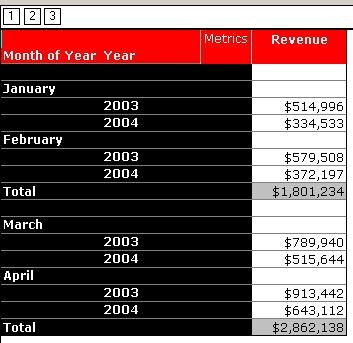
For example, as seen in the report below, there are two subtotals - one that calculates the revenue for January and February and the other for March and April:
 

ka02R000000kVxgQAE_0EM440000002FKw.jpeg

 
Follow the steps below in the Strategy Tutorial project to utilize this functionality:
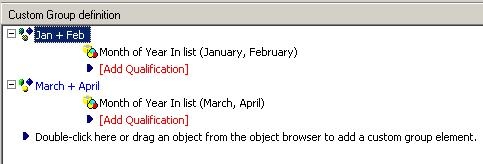
 

  • Create a custom group (or a consolidation) that has the following definition where the first element is a sum of January and February and the second is a sum of March and April:
ka02R000000kVxgQAE_0EM440000002FL5.jpeg
  • Add this custom group to the left of the 'Month of Year' attribute. Then go to Grid > Options and set the column width for this custom group to 0 so the custom group is hidden.
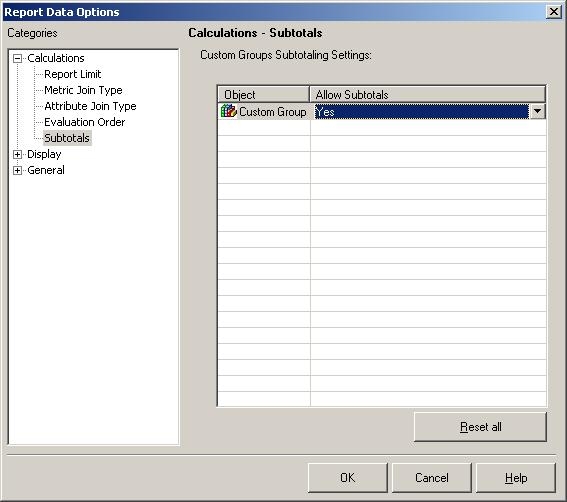
  • Go to Data > Report Data Options > Subtotals and enable the subtotals for the custom group, as shown below:
ka02R000000kVxgQAE_0EM440000002FKz.jpeg
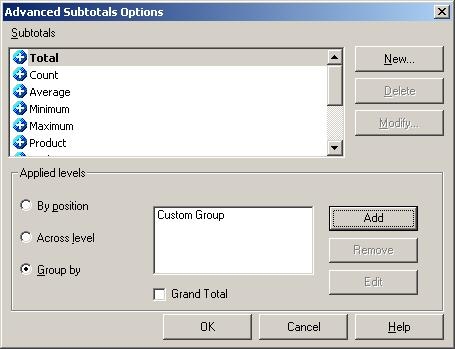
  • Enable subtotals by going to Data > Subtotals and choose Total. Click on Advanced > Group By and choose the custom group, as shown below:
ka02R000000kVxgQAE_0EM440000002FL1.jpeg
  • Display the results in Outline Mode.
  • Execute the report and the above results will be displayed.

Comment

0 comments

Details

Knowledge Article

Published:

May 16, 2017

Last Updated:

May 16, 2017