EducationSoftwareStrategy.com
StrategyCommunity

Knowledge Base

Product

Community

Knowledge Base

TopicsBrowse ArticlesDeveloper Zone

Product

Download SoftwareProduct DocumentationSecurity Hub

Education

Tutorial VideosSolution GalleryEducation courses

Community

GuidelinesGrandmastersEvents
x_social-icon_white.svglinkedin_social-icon_white.svg
Strategy logoCommunity

© Strategy Inc. All Rights Reserved.

LegalTerms of UsePrivacy Policy
  1. Home
  2. Topics

KB15206: How can it be determined via MicroStrategy Enterprise Manager which reports will be affected by a table not being successfully loaded during an ETL process?


Community Admin

• Strategy


It is, unfortunately, common that sometimes when an ETL process occurs certain tables are either not loaded or fail during the load. Therefore, it is important to know which Strategy reports will be affected so that users can be notified or the cause can easily be determined when a user complains that the report is giving no data or old data.
 
Strategy Enterprise Manager 9.x can be used to help answer this question. It will not be possible to determine if new reports which have not been run yet will be affected. There is in fact no way to determine if a report will be affected before it is run due to the fact that Strategy will not know the SQL for the report until it attempts to run generate the SQL.
 
In order to use Strategy Enterprise Manager 9.x to answer this question, the following prerequisites must be met:
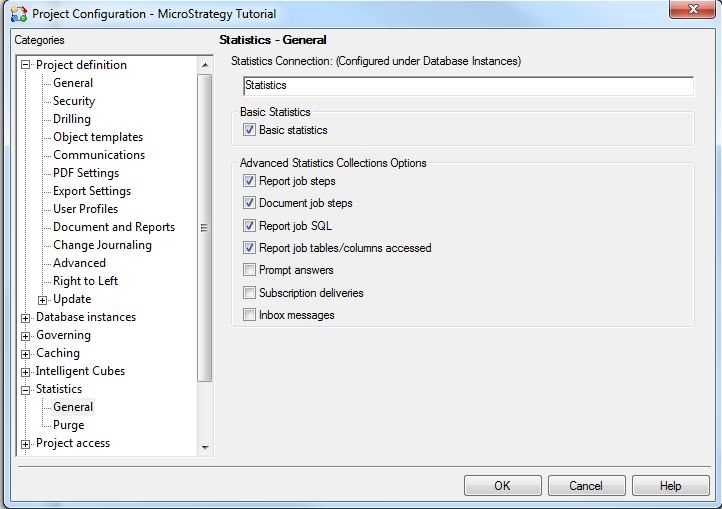
 

  • The project holding the reports which are in question must have statistics logging turned on.
  • Statistics for the project must have at least the following selected:
     
    • Basic statistics
    • Report job steps
    • Document job steps
    • Report job SQL 
    • Report jobs Tables/Columns accessed

       
ka04W00000148EvQAI_0EM440000002BXt.jpeg
  • The data load for Strategy Enterprise Manager 9.x must have occurred after the reports were executed.

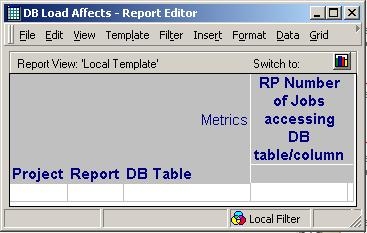
If all of the prerequisites are met, the following is the basic report template which is necessary:
 

ka04W00000148EvQAI_0EM440000002BXu.jpeg

 
On the template: 

  • Attributes: Report, DB Table (NOTE: Project is not necessary but it helps to identify the reports better)
  • Metric: RP Number of Jobs accessing DB table/column

If the relationship between DB Table and Report is examined, it will be seen that no relationship exists. This is in fact true. The key to the report is the metric 'RP Number of Jobs accessing DB table/column'. This is what forces both Report and DB Table to be related.
 
NOTE:

  • This is an expensive report. It is normal for it to take a long time to execute.
  • Placing a filter on Project on the report will drastically increase time it takes to execute the report.
  • It is recommended to place a filter on the report to filter based on date (i.e. get a sample of only the last two weeks of data.)
  • It is also possible to prompt on the DB Table attribute so that only reports hitting the problematic tables are reported.
  • If OLAP is available, it may be desired to execute the report on a daily, weekly, etc. basis depending on the data load. This way the report can be cached and thus if a problem is known later with the warehouse data load the report does not have to take so long to run. A view filter can be applied to see only the affected DB Tables and the associated reports.

Comment

0 comments

Details

Knowledge Article

Published:

June 9, 2017

Last Updated:

January 17, 2018