SYMTOM:
In Strategy Developer 10.x, users with the 'bypass all object security access check' privileges cannot edit or delete any schema objects, as shown below:
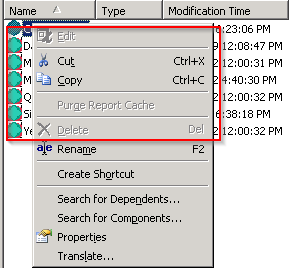
Notice that when right-clicking on any schema objects, the 'Edit and 'Delete' options are grayed out in both 2-tier and 3-tier connections.
CAUSE:
Users do not have Strategy Architect license on the Strategy Intelligence Server machine. This license is required in other to edit or delete any schema objects.
ACTION:
Launch Strategy License Manager to check if Strategy Architect is licensed, or send CD key applied in Strategy Intelligence Server to Strategy Technical Support for confirmation. To launch Strategy License Manager, go to Start > Programs > Strategy Tools> License Manager.
