EducationSoftwareStrategy.com
StrategyCommunity

Knowledge Base

Product

Community

Knowledge Base

TopicsBrowse ArticlesDeveloper Zone

Product

Download SoftwareProduct DocumentationSecurity Hub

Education

Tutorial VideosSolution GalleryEducation courses

Community

GuidelinesGrandmastersEvents
x_social-icon_white.svglinkedin_social-icon_white.svg
Strategy logoCommunity

© Strategy Inc. All Rights Reserved.

LegalTerms of UsePrivacy Policy
  1. Home
  2. Topics

KB15336: An error occurs when duplicating any project from Object Manager or Developer 10.x on a particular machine: Project duplication could not acquire exclusive locks to the source and destination project sources.


Stefan Zepeda

Salesforce Solutions Architect • Strategy


This article discusses an error seen in project duplication caused by folder permissions on the machine the duplication is occurring on.

SYMPTOM
When attempting to duplicate any project from Object Manager or Developer 10.x on a particular machine, the following error may occur:

 

ka044000000kJNSAA2_0EM440000002DDE.jpeg


Project duplication could not acquire exclusive locks to the source and destination project sources. Please clear existing locks on the project sources and try again
 
NOTE: It is possible to perform the project duplication from other machines. 
 
CAUSE
One possible cause of this issue may be that the privileges on the file or folder specified for the duplication logs are insufficient for the user in question at the level of the operating system. 
 
ACTION
This issue can be addressed by the following means:

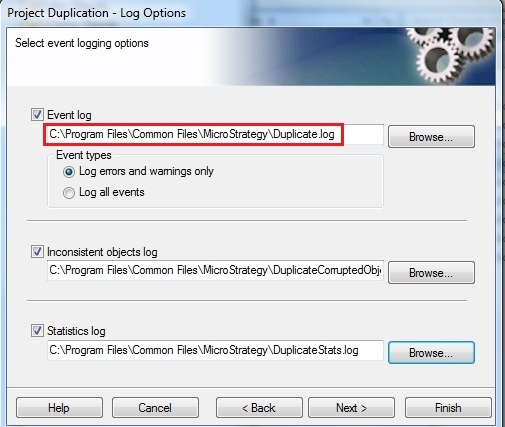
  • Modifying the location specified for the duplication logs to one for which the user has sufficient permissions:
     
ka044000000kJNSAA2_0EM440000002DDD.jpeg
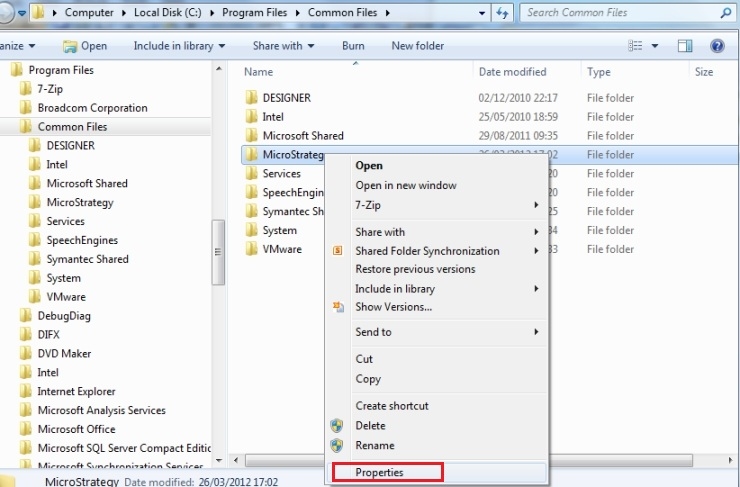
  • Navigating to the location defined in the final stage of the duplication dialog, right-clicking the folder or file and selecting the 'Properties' option to ensure that the user has sufficient privileges to read and write to this location:
     
ka044000000kJNSAA2_0EM440000002DDA.jpeg
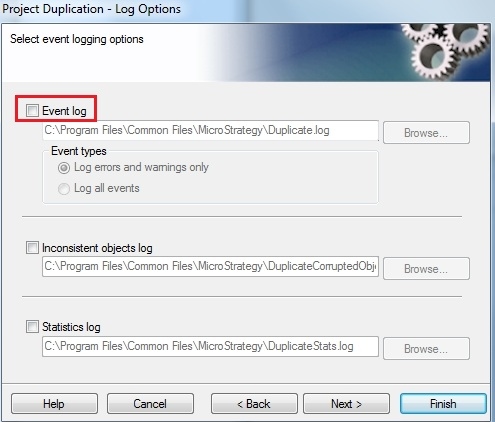
  • Disabling logging by unchecking the options specified in the last screen of the project duplication dialog:
     
ka044000000kJNSAA2_0EM440000002DDG.jpeg

 
Third Party Software Installation:
WARNING:
The third-party product(s) discussed in this technical note is manufactured by vendors independent of Strategy. Strategy makes no warranty, express, implied or otherwise, regarding this product, including its performance or reliability.
 
KB15336


Comment

0 comments

Details

Knowledge Article

Published:

April 4, 2017

Last Updated:

December 29, 2018