By default, Strategy Web, Web Services and Mobile ASP running on IIS come with a default JRE installation. It is possible to use a different or newer JRE if needed as long as the JRE is certified and supported with the corresponding version of the Strategy product installed on the machine. Follow the instructions below to change the version of JRE used by Strategy Web, Web Services and Mobile:
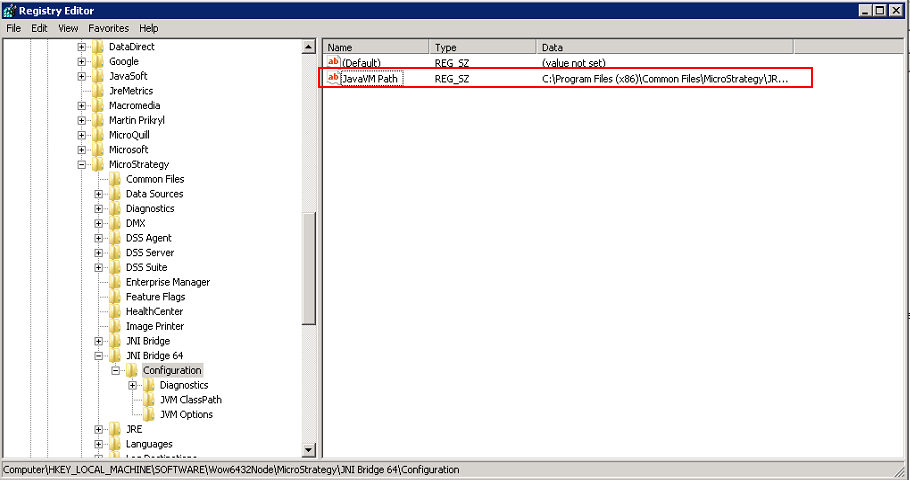
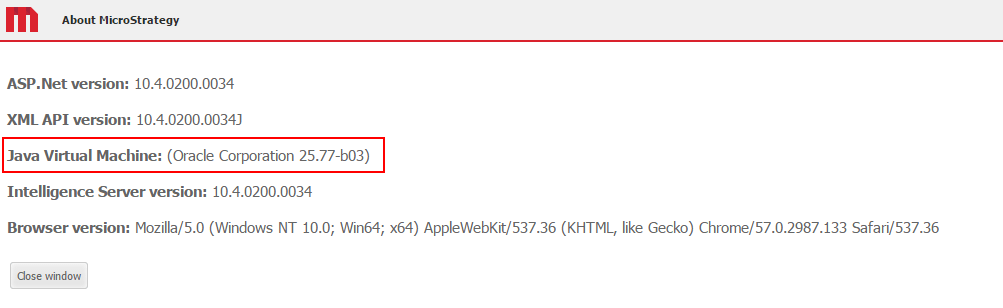
NOTE: The instructions above are specific for users using Strategy Web, Web Services and Mobile running on Microsoft IIS. For Strategy Web Universal, Web Services Universal and Mobile Universal running on J2EE web application servers, refer to the documentation of the specific application server being used for instructions on how to change the JRE.
Registry Modification:
WARNING:
Modifying registry values incorrectly may cause serious, system-wide problems that may require the re-installation of Microsoft Windows NT. Any edit of the registry is done at the user`s own risk. Since these are user-initiated changes, they are not covered by any Strategy warranty. If using Microsoft Windows NT, the user should backup the registry and/or update an Emergency Repair Disk (ERD) prior to alterations.
Code Customization:
WARNING:
This customization is provided as a convenience to Strategy users and is only directly applicable to the version stated. While this code may apply to other releases directly, Strategy Technical Support makes no guarantees that the code provided will apply to any future or previous builds. In the event of a code change in future builds, Strategy may not be able to provide additional code on this matter even though this customization is provided at this time for this specific build.
Third Party Software Installation:
WARNING:
The third-party product(s) discussed in this technical note is manufactured by vendors independent of Strategy. Strategy makes no warranty, express, implied or otherwise, regarding this product, including its performance or reliability.
