EducationSoftwareStrategy.com
StrategyCommunity

Knowledge Base

Product

Community

Knowledge Base

TopicsBrowse ArticlesDeveloper Zone

Product

Download SoftwareProduct DocumentationSecurity Hub

Education

Tutorial VideosSolution GalleryEducation courses

Community

GuidelinesGrandmastersEvents
x_social-icon_white.svglinkedin_social-icon_white.svg
Strategy logoCommunity

© Strategy Inc. All Rights Reserved.

LegalTerms of UsePrivacy Policy
  1. Home
  2. Topics

KB15447: How to remove users from a security filter in bulk in MicroStrategy Developer 9.x


Stefan Zepeda

Salesforce Solutions Architect • Strategy


Administrators may want to remove a large number of users for management with security filters. This article illustrates how to do so.

Administrators may want to remove a large number of users for management with security filters.  The following illustrates how to do so. 
Open the Security Filter Manager in Strategy Desktop by selecting Administration > Projects > Security Filter Manager…

ka044000000kJMpAAM_0EM440000002DHI.png

If the security filter is expanded on the right-hand side, each user can only be selected one by one and multiple users cannot be selected to be removed using the < button
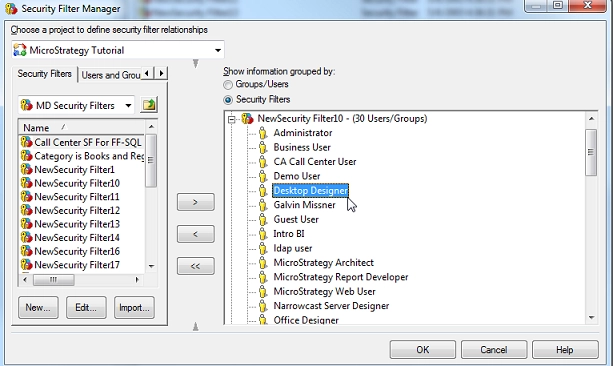
ka044000000kJMpAAM_0EM440000002DH0.png

To bulk remove all users from the security filter, the security filter itself rather than the users can be selected before clicking the < button.  This will remove the entire security filter and all attached users.

ka044000000kJMpAAM_0EM440000002DHB.png

The security filter may then be added back using the > button, and all the users will have been removed
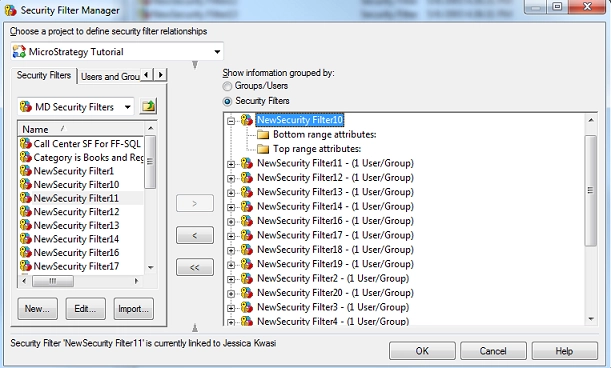
ka044000000kJMpAAM_0EM440000002DGy.png

Article Reference Number: 
KB15447


Comment

0 comments

Details

Knowledge Article

Published:

June 14, 2017

Last Updated:

December 31, 2018