EducationSoftwareStrategy.com
StrategyCommunity

Knowledge Base

Product

Community

Knowledge Base

TopicsBrowse ArticlesDeveloper Zone

Product

Download SoftwareProduct DocumentationSecurity Hub

Education

Tutorial VideosSolution GalleryEducation courses

Community

GuidelinesGrandmastersEvents
x_social-icon_white.svglinkedin_social-icon_white.svg
Strategy logoCommunity

© Strategy Inc. All Rights Reserved.

LegalTerms of UsePrivacy Policy
  1. Home
  2. Topics

KB15451: How to export list of all warehouse tables being used in a MicroStrategy project to Microsoft Excel


Stefan Zepeda

Salesforce Solutions Architect • Strategy


How to export list of all warehouse tables being used in a MicroStrategy project to Microsoft Excel

Users may want to use the 'Export Project Schema' functionality to export the list of warehouse tables imported to a project (using the Warehouse Catalog) to Microsoft Excel. To do this, follow the steps below:
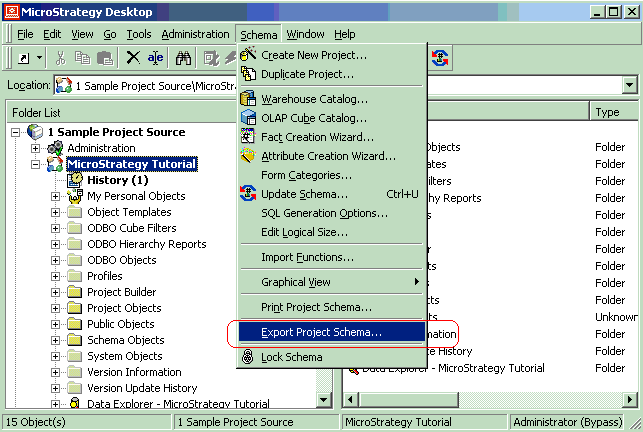
 

  • Select the project name and launch the Export Project Schema window in the Schema toolbar in Strategy Desktop, as shown below:
ka02R000000kcacQAA_0EM440000002FIm.gif
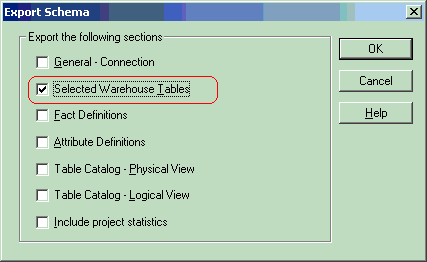
  • Keep 'Selected Warehouse Tables' selected, as shown below:
ka02R000000kcacQAA_0EM440000002FIk.gif
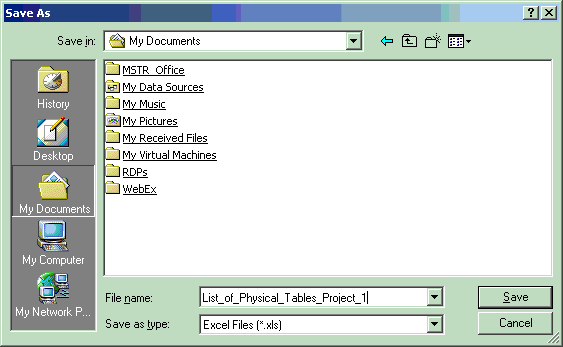
  • Save it with an appropriate name when prompted, as shown below:
ka02R000000kcacQAA_0EM440000002FIi.gif
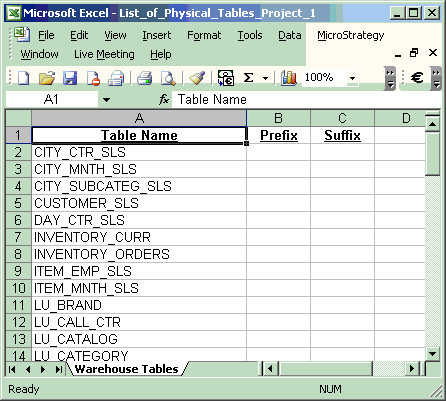
  • It can be see that the document lists the names of all physical tables and prefixes or suffixes (if any), as shown below:
ka02R000000kcacQAA_0EM440000002FIg.gif

For more details about the 'Export Project Schema' functionality, refer to the following Strategy Knowledge Base technical note:
 
KB7220 (KB4000-71X-0733): How to export a project schema to Excel in Strategy Desktop versions 8.x


Comment

0 comments

Details

Knowledge Article

Published:

April 11, 2017

Last Updated:

April 11, 2017