EducationSoftwareStrategy.com
StrategyCommunity

Knowledge Base

Product

Community

Knowledge Base

TopicsBrowse ArticlesDeveloper Zone

Product

Download SoftwareProduct DocumentationSecurity Hub

Education

Tutorial VideosSolution GalleryEducation courses

Community

GuidelinesGrandmastersEvents
x_social-icon_white.svglinkedin_social-icon_white.svg
Strategy logoCommunity

© Strategy Inc. All Rights Reserved.

LegalTerms of UsePrivacy Policy
  1. Home
  2. Topics

KB15467: 'SQLDriverConnect. Invalid username/password; logon denied’ error occurs when a user is attempting to execute reports in MicroStrategy Developer 9.4.1 and 10.x.


Stefan Zepeda

Salesforce Solutions Architect • Strategy


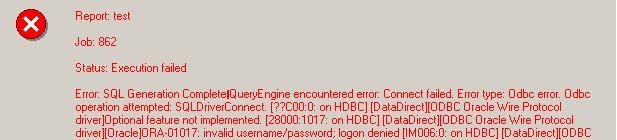
For a particular user, the following error occurs when executing reports in MicroStrategy Developer 9.4.1 and 10.x: SQL Generation Complete QueryEngine encountered error: Connect failed. Error type: Odbc error. Odbc operation attempted: SQLDriverConnect. Invalid username/password; logon denied.

SYMPTOM:
For a particular user, the following error occurs when executing reports in Strategy Developer 9.4.1 and 10.x:
 

ka02R000000kXHRQA2_0EM440000002FHn.jpeg


SQL Generation Complete QueryEngine encountered error: Connect failed. Error type: Odbc error. Odbc operation attempted: SQLDriverConnect. Invalid username/password; logon denied.
 

CAUSE:
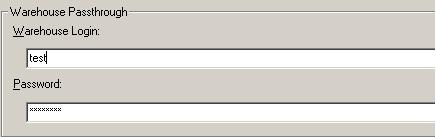
The user may be using Warehouse Pass-through and is using an incorrect warehouse login to access the data, as shown below:
 

ka02R000000kXHRQA2_0EM440000002FHs.jpeg

 
ACTION:
Disable the Warehouse Passthrough option for the user or apply the correct warehouse login to access the data.


Comment

0 comments

Details

Knowledge Article

Published:

June 19, 2017

Last Updated:

June 19, 2017