EducationSoftwareStrategy.com
StrategyCommunity

Knowledge Base

Product

Community

Knowledge Base

TopicsBrowse ArticlesDeveloper Zone

Product

Download SoftwareProduct DocumentationSecurity Hub

Education

Tutorial VideosSolution GalleryEducation courses

Community

GuidelinesGrandmastersEvents
x_social-icon_white.svglinkedin_social-icon_white.svg
Strategy logoCommunity

© Strategy Inc. All Rights Reserved.

LegalTerms of UsePrivacy Policy
  1. Home
  2. Topics

KB15510: How to create non time-based transformations in MicroStrategy Desktop and Developer


Community Admin

• Strategy


This article explains how to create non time-based transformations in MicroStrategy Desktop and Developer.

Although transformations are typically used for performing analysis on time-based trends, not all transformations must time based. The following steps document how to create and use a non-time-based expression transformation in Strategy Tutorial Project:
  • Create a new transformation, and select Category as the member attribute
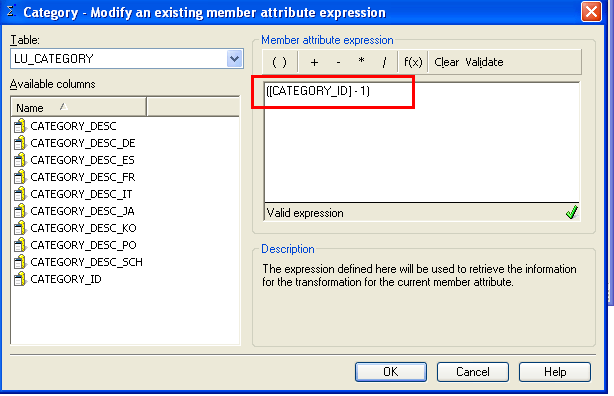
  • In the drop-down menu, select LU_CATEGORY as the member attribute table, and add CATEGORY_ID as the member attribute expression
  • Modify the attribute expression as shown below, in order to transform CATEGORY_ID
     
ka04W000000uGCfQAM_0EM440000002DJb.png
  • Select the transformation mapping type as 'one to one,' save and close the new transformation, and update schema

The above steps document how to create a non-time-based transformation schema object. The following steps document how to apply that transformation to a metric, and include it in a report which brings back relevant transformed data in Strategy Tutorial Project 9.4.1 - 10.x:

  • Create a new metric as sum(cost), and add the non-time-based transformation to the metric
     
ka04W000000uGCfQAM_0EM440000002DJd.png
  • Create a new report, and add the Category attribute, the Cost metric, and the transformed metric created in step 1 to the report template.
  • Execute the report, and notice how the categories are transformed, comparing music to movies, and movies to electronics
     
ka04W000000uGCfQAM_0EM440000002DJw.png


KB15510


Comment

0 comments

Details

Knowledge Article

Published:

June 12, 2017

Last Updated:

December 3, 2018