EducationSoftwareStrategy.com
StrategyCommunity

Knowledge Base

Product

Community

Knowledge Base

TopicsBrowse ArticlesDeveloper Zone

Product

Download SoftwareProduct DocumentationSecurity Hub

Education

Tutorial VideosSolution GalleryEducation courses

Community

GuidelinesGrandmastersEvents
x_social-icon_white.svglinkedin_social-icon_white.svg
Strategy logoCommunity

© Strategy Inc. All Rights Reserved.

LegalTerms of UsePrivacy Policy
  1. Home
  2. Topics

KB15534: Where to find the originmessageID when creating URL parameters using MicroStrategy Web


Community Admin

• Strategy


This article explains how to find the originmessageID when creating URL parameters that corresponds to an existing report, or document instance.

The originmessageID corresponds to an existing report, or document instance. This is used by the resulting report or document to extract the prompt answers from the specified instance and use them as prompt answers to any corresponding prompts in the requested report  or document.
 
To obtain the originmessageID when creating URL parameters using Strategy Web 9.4.1 and above, follow the steps below:
 

  • To find the originmessageID that corresponds to an existing report or document instance, run that specific instance in Strategy Web.
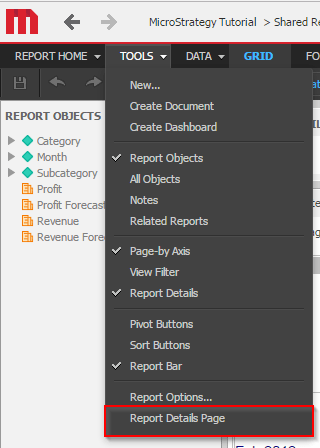
  • Go to Tools > Report Details Page / Document Details Page, as shown below:
ka04W000000Oe42QAC_0EM440000002HeY.png
  • Click on the 'Show Advanced Details…' button at the bottom of the page, as shown below:
     
ka04W000000Oe42QAC_0EM4400000028og.png
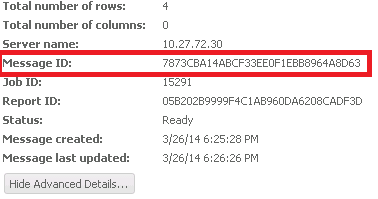
  • Note the 'Message ID'. This is used as the originmessageID when creating URL parameters for Strategy reports or documents, as shown below:
     
ka04W000000Oe42QAC_0EM4400000028oa.png

Comment

0 comments

Details

Knowledge Article

Published:

March 30, 2017

Last Updated:

March 30, 2017