EducationSoftwareStrategy.com
StrategyCommunity

Knowledge Base

Product

Community

Knowledge Base

TopicsBrowse ArticlesDeveloper Zone

Product

Download SoftwareProduct DocumentationSecurity Hub

Education

Tutorial VideosSolution GalleryEducation courses

Community

GuidelinesGrandmastersEvents
x_social-icon_white.svglinkedin_social-icon_white.svg
Strategy logoCommunity

© Strategy Inc. All Rights Reserved.

LegalTerms of UsePrivacy Policy
  1. Home
  2. Topics

KB15544: 0x8004500e: C:\Program Files\MicroStrategy\Web Services\projectsources.xml (The system cannot find the file specified) error occurs when opening MicroStrategy Office


Community Admin

• Strategy


"0x8004500e: C:\Program Files\MicroStrategy\Web Services\projectsources.xml (The system cannot find the file specified)" error occurs when projectsources.xml is not under expected location within MicroStrategy Web Services deployment folder

SYMPTOM:
The following error occurs when trying to start Strategy Office 9.x:

 

ka04W00000148acQAA_0EM4400000028o5.jpeg

 
0x8004500e: C:\Program Files\MicroStrategy\Web Services\projectsources.xml (The system cannot find the file specified)
CAUSE:
The Web Services projectsources.xml file does not exist in the same folder as the MSTRWS.asmx file.
 
ACTION:
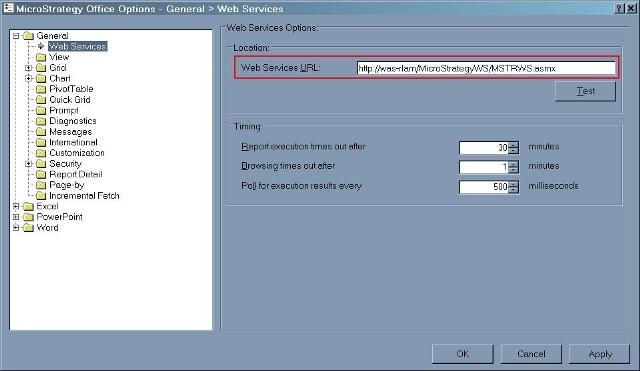
To locate the MSTRWS.asmx file, open the Strategy Office Configuration to see how the Web Services URL is defined, as shown below:
 

ka04W00000148acQAA_0EM4400000028o7.jpeg

 
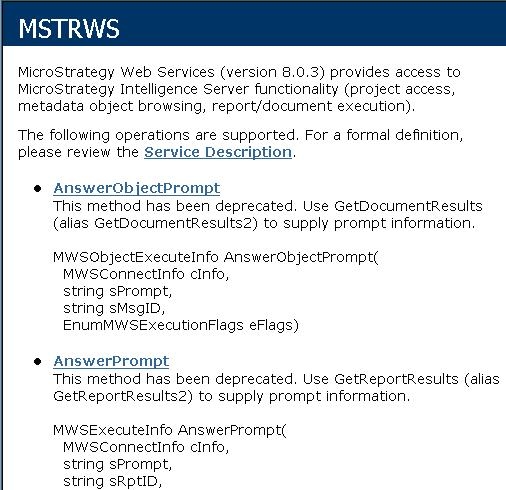
The projectsources.xml file should be located in the folder path that is highlighted in red above. To ensure the URL specified above is correct, click the Test button below the Web Service URL and the following window should open:
 

ka04W00000148acQAA_0EM4400000028o3.jpeg


Comment

0 comments

Details

Knowledge Article

Published:

May 25, 2017

Last Updated:

May 25, 2017