SYMPTOM:
An administrator has a source and a target project that will be merged using Project Merge.
In the source project, the administrator has a number of hierarchies that will be moved to the destination. All of them have the option 'Use as drill map' checked, as shown below:

However, after doing a Project Merge from source to destination with the following Rules set, the Administrator notices that in the target project, all of the hierarchies have the option 'Use as a drill map' unchecked:

CAUSE:
This is a known issue with Strategy Project Merge and Object Manager
The issue is caused by the target project not having a default drill map set before the Project Merge, as shown below:
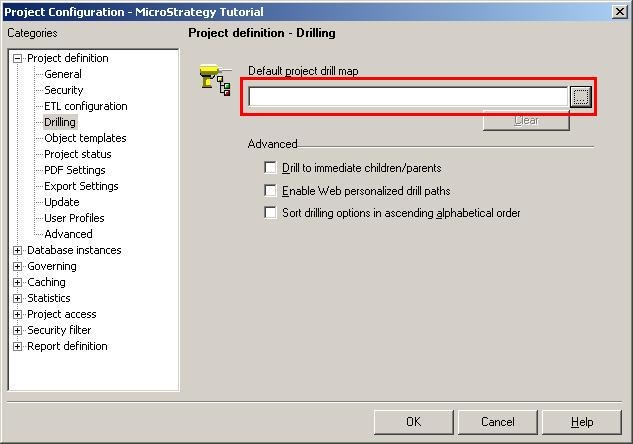
When an architect checks the 'Use as a drill map' for a hierarchy and no default drill map is set in any project, then one is created by default and it links to the hierarchy where the option is checked. In the target project above, no default drill map is set, and there are no hierarchies with the 'Use as a drill map' option selected. Therefore, when the hierarchies are moved over from the source to target project, because they are not dependent on the default drill map (as part of the issue), the default drill map set in the source project will not be brought over and assigned to the target project. Therefore, the merge will migrate all of the hierarchies over, but since it does not bring over the default drill map that it is linked to, then the checkbox is unchecked.
ACTION:
An issue has been logged so that if a default drill map is present in the source project and there are hierarchies linked to it, that the default drill map will be moved over to the destination and keep the 'Use as a drill map' option checked in the hierarchies.
WORKAROUND:
To work around this issue, administrators will need to move over the default drill map that is being used in the source project, and then set it as the default drill map in the target project before doing any migrations of the hierarchies. To do this, follow the steps below:
